


MailerLite has changed. It is known for simplicity and ease of use, but its features, pricing and plan structure have changed in 2026. So, is it still one of the best email marketing platforms for bloggers, creators, small businesses, and growing brands?
Choosing an email marketing tool can feel like standing in front of a shelf with 50 cereal boxes, all promising better results, faster growth, and more sales. Pick the wrong one, and you could end up paying for features you rarely use or wrestling with a dashboard that makes simple tasks harder than they should be.
That’s where MailerLite comes in. MailerLite has built a strong reputation for being easy to use, affordable, and packed with the essential tools most businesses need to build and manage email campaigns. Its platform combines email marketing, automation, landing pages, forms, and other marketing tools in a relatively simple interface.
But here’s the real question: does MailerLite still live up to the hype?
In this MailerLite review, I’ll put its features, pricing, automation, ease of use, and overall performance under the microscope. I’ll also look at where MailerLite shines, where it falls short, and which types of users are likely to get the most value from it. By the end, I'll help you decide whether MailerLite is worth paying for based on what you actually get today.
Table of Contents
What is MailerLite?
MailerLite is an all-in-one email marketing solution you can use to create, manage, and optimise email campaigns with a user-friendly interface and powerful features. Its affordability and ease of use make it popular for anyone looking to enhance their email marketing efforts. MailerLite allows you to create and manage various email campaigns, including newsletters, promotional emails, and automated email sequences. It also includes an intuitive drag-and-drop editor for designing emails, making it accessible even for users without coding or design experience.
MailerLite also offers robust automation features you can use to set up workflows for sending automated emails based on specific triggers like subscriber actions or dates. You can also segment your email lists based on different criteria, such as demographics, behaviour, and engagement, to send more targeted emails to people on your list.
With MailerLite, you can create landing pages and signup forms to capture leads and grow your subscriber lists. You can also use it to build your own stunning website and sell your digital products and subscriptions using the MailerLite built-in e-commerce feature.
MailerLite also has detailed analytics and reporting features, allowing you to track your email campaigns’ performance, including open rates, click-through rates, and conversions. To simplify marketing efforts, MailerLite can be integrated with various third-party applications in your tech stack, including e-commerce platforms, CRM systems, and other marketing tools. As you can see, MailerLite is more than just an email marketing platform; it is a digital hub and an all-in-one marketing solution for building, creating, and simplifying your marketing efforts.
MailerLite Key Features
MailerLite packs a lot of functionality into one platform, but its main strength is keeping the tools relatively simple to use. Whether you want to send newsletters, build automated campaigns, collect subscribers, create a website, or sell digital products, you can handle many of these tasks without switching between several platforms.
Here are the key MailerLite features.
- Drag-and-Drop Email Builder
MailerLite’s drag-and-drop email builder lets you create professional emails without stress. You can add and rearrange content blocks such as text, images, buttons, videos, social links, and other elements, then customise them to match your brand. The builder also supports e-commerce content blocks, allowing connected stores to display products inside emails. You can save customised blocks and templates for future campaigns.
- Email Templates
If starting an email from a blank page isn’t your idea of fun, MailerLite provides pre-built templates for newsletters and other campaigns. You can select a template, replace the existing content, adjust the design, and save your own versions for later use.
- Automation
MailerLite’s automation builder lets you create workflows that automatically send emails based on subscriber actions or other triggers. You can use it for welcome sequences, abandoned-cart reminders, product follow-ups, customer journeys, and other automated campaigns.
- Transactional Emails
MailerSend is built for emails triggered by specific actions, such as password resets, purchase confirmations, account notifications, and other system-generated messages. It supports API and SMTP sending, templates, tracking, webhooks, and integrations for technical implementations.
- Landing Pages
MailerLite includes a landing page builder for creating pages used to collect leads, promote products, distribute lead magnets, or support marketing campaigns. You can easily build pages using pre-designed templates and drag-and-drop content blocks. Landing pages can also work alongside its forms and automation tools, allowing new subscribers to enter your email marketing workflows.
- Forms
MailerLite provides signup forms for collecting subscribers from your website and other online channels. Depending on the setup, you can use embedded forms, pop-ups, and other signup options to capture leads. The collected subscribers can be organised into groups or segments and used in campaigns and automations.
- Website Builder
MailerLite goes beyond email marketing with a no-code website builder. Its drag-and-drop editor lets you create pages by adding and rearranging content blocks, customise templates, and publish a website without needing extensive technical knowledge. The website builder also supports blogs, lead-generation forms, analytics, and e-commerce features.
- Subscriber Management
MailerLite gives you a central place to store and manage subscriber information. You can import contacts, edit individual profiles, add custom fields, create groups, and filter subscribers based on different conditions. You can also use subscriber activity and other data to create more targeted campaigns.
- Blogging Tool
MailerLite includes a blog builder that allows you to create and publish blog content without using a separate content management system. You can build blog layouts with a visual editor, publish posts, organise content with categories, and connect your own domain. The blog can also work alongside its email marketing tools, giving you another way to attract visitors and turn them into subscribers.
- List Management
List management in MailerLite revolves around groups, segments, subscriber fields, and subscriber activity. You can organise contacts based on interests, behaviour, signup details, or other information stored in their profiles.
- Analytics
It provides reporting tools to help you measure how your campaigns and automations perform. You can track metrics such as opens, clicks, conversions, subscriber activity, sales, and form performance. Its reporting tools also support custom reports, comparative date ranges, A/B testing data, and e-commerce revenue tracking.
- Email Verifier
MailerLite includes an email verification tool that helps identify potentially invalid or risky addresses before they damage the quality of your list. The email verifier helps reduce bounces and keep your subscriber database cleaner.
- Integrations
It also connects with numerous third-party services, allowing data to move between your email marketing system and other tools you already use. It integrates with over 150 third-party platforms; popular integrations include Shopify, WooCommerce, WordPress, Stripe, and Zapier.
Getting Started with MailerLite
When you first log in to MailerLite, you'll land on your account dashboard:
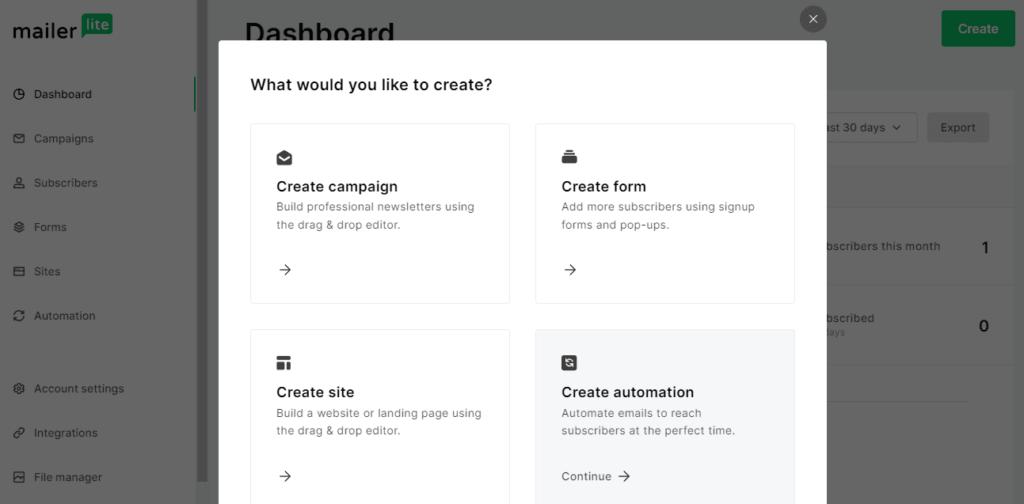
From the dashboard, you can create campaigns, forms, websites and automations, and view your key metrics and KPIs for ongoing campaigns, such as subscriber counts, email opens, clicks, and form signups.
Navigating MailerLite
All of MailerLite's features are accessible via the sidebar on the left. These features are organised into five main sections: Campaigns, Subscribers, Forms, Sites, and Automation.
Campaigns
The magic happens in MailerLite within the Campaigns. You can design and send newsletters, run A/B tests, and set up RSS and auto-resend campaigns.
To create a new campaign, click the "Create" button, and a new page will appear.
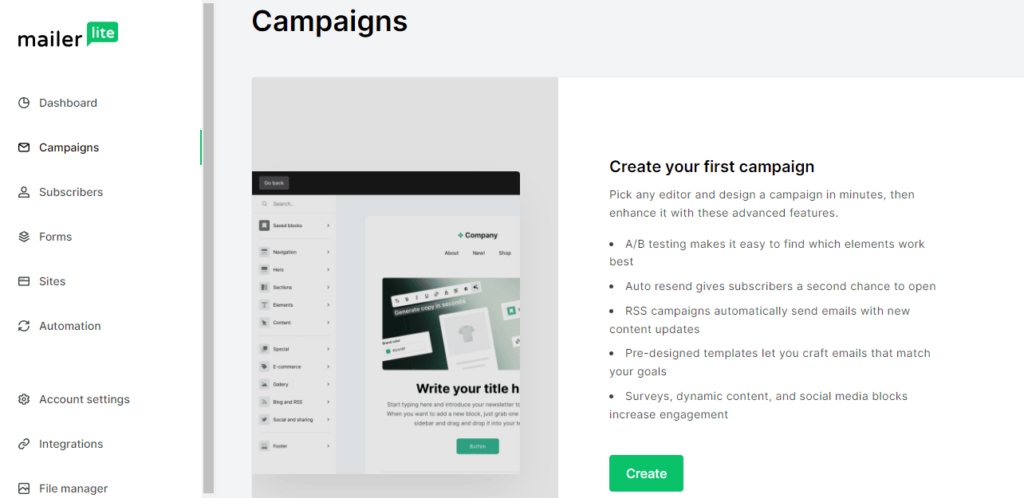
Then, choose the type of campaign you want to create, enter a campaign name, subject, and preheader, and select your recipients if you already have them.
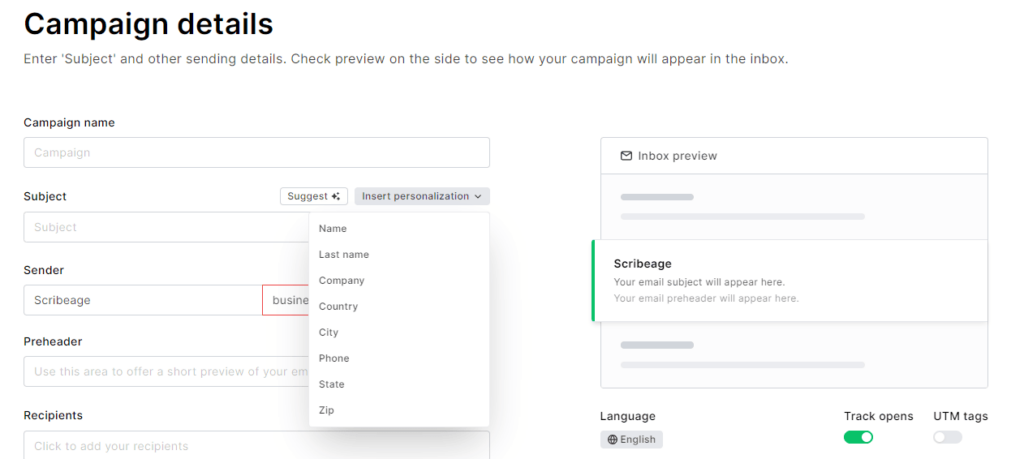
You can also personalise your subject with the recipient's name or any other personalisation, including the zip code. You can also use its AI generative assistance to generate your subject line idea.
Template Gallery
MailerLite offers over 80 professionally designed newsletter templates you can customise to match your brand. MailerLite newsletter templates cover different business niches and categories, including E-commerce, healthcare and wellness. You don't need any coding skills to make these templates your own. Just drag and drop elements like text, images, and buttons to create a unique and engaging newsletter.
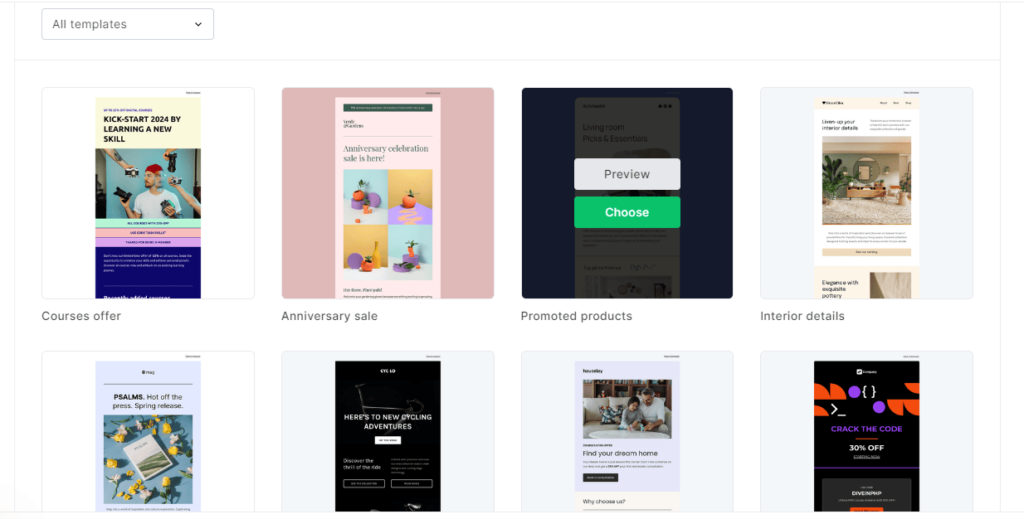
For instance, if you own an online store, you can use MailerLite's e-commerce templates to send a monthly newsletter featuring new arrivals, special discounts, and customer testimonials. The responsive design ensures that your emails look great on any device your customers use.
MailerLite Email Editor
MailerLite's email editor is a robust tool designed to help you create beautiful and effective email campaigns with ease.
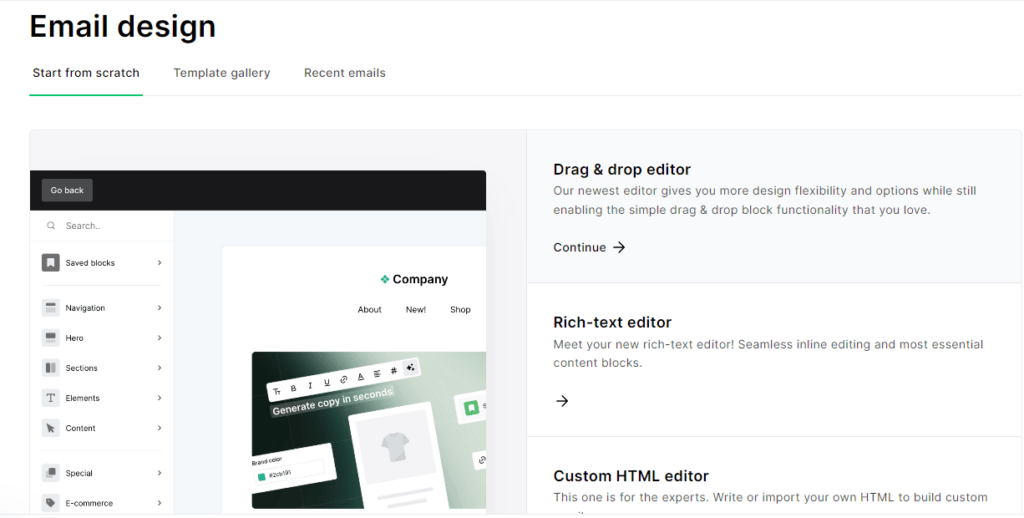
There are three editors to choose from:
- Drag-and-Drop Interface
The email editor employs a drag-and-drop interface, making it incredibly user-friendly. With a drag-and-drop editor, you can quickly create professional emails by dragging elements like text blocks, images, buttons, and videos into your email template.
- Rich-Text Editor
The email rich-text editor is designed to be easy to use; it resembles traditional word processors. You can effortlessly format your text without any advanced technical skills. Its intuitive interface and comprehensive features make it easy to format text, insert media, and personalise content; if you need more control over your email’s design, you can switch to the HTML source code view within the rich-text editor to fine-tune your email design.
- HTML Editor
If you want total control over your email design, MailerLite also offers an HTML editor. You can switch between the drag-and-drop and HTML editor to fine-tune your email design.
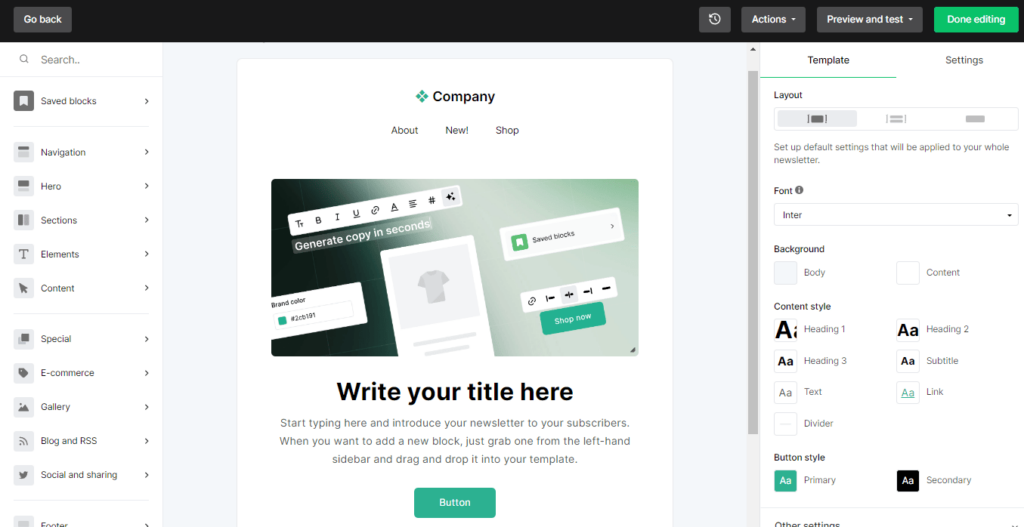
You can use MailerLite email drag-and-drop functionality to build your email layout quickly and easily. You can drag various content blocks from the left-hand side (like text, images, buttons, and videos) into your email template and arrange them to your liking. You can use many blocks like countdown timers, image galleries, social links, sharing buttons, product blocks, etc.
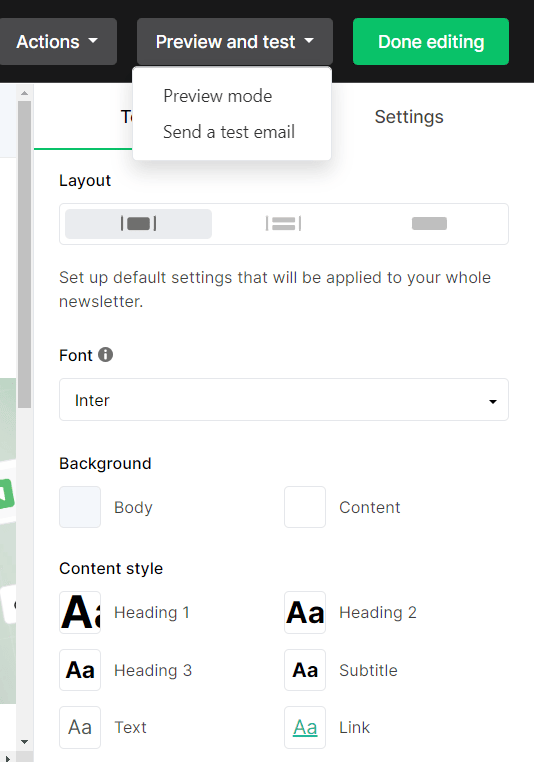
Once you design the email to your taste, click Preview and test to view a full-size preview or send a test email to see how the email will look on a desktop or mobile device.
When you have finished designing your email, click the Done editing button to move on to the review and schedule page, where you will review and schedule your email for sending.
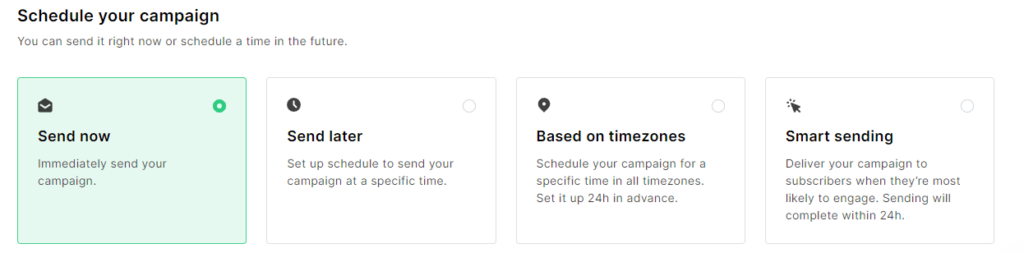
Once you have checked the details of your email campaign, if everything is fine, the next step is to schedule your email campaign; you can send your email right now or schedule it for the future. You can also schedule your email to deliver based on time zone or use an intelligent sending feature to deliver your email when your subscribers are likely to engage with it.
Subscribers
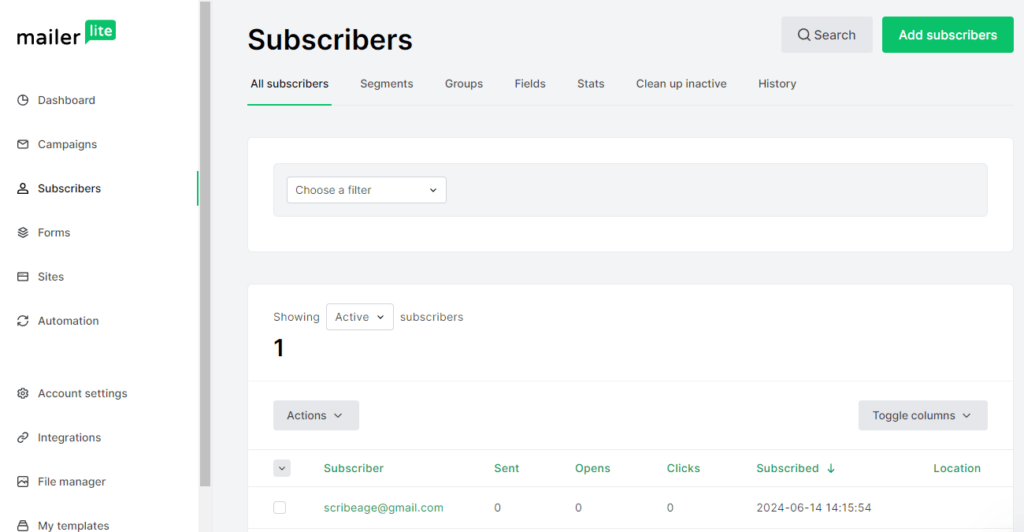
If you click on subscribers from the left side of the dashboard, you can view your subscribers here, alongside basic information like the date they subscribed, their location, and the number of emails you sent, opened, and clicked.
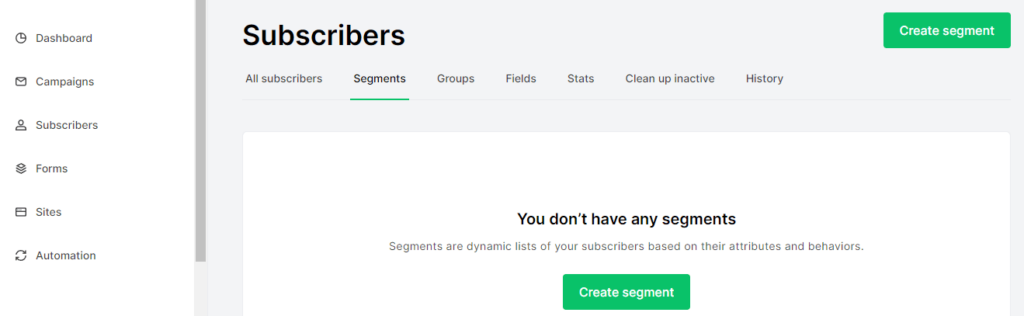
You can segment your contact list under Segments and Groups based on your subscribers' interests and engagement to send them targeted messages individually in your campaigns. Click the "Click Segment" button to segment your list.
Clean up Inactive
MailerLite comes with a tool to help you clean up your email list from inactive subscribers. Under the Clean up inactive tab, you can quickly clean up all the subscribers that occupy space but don't open your previous emails.
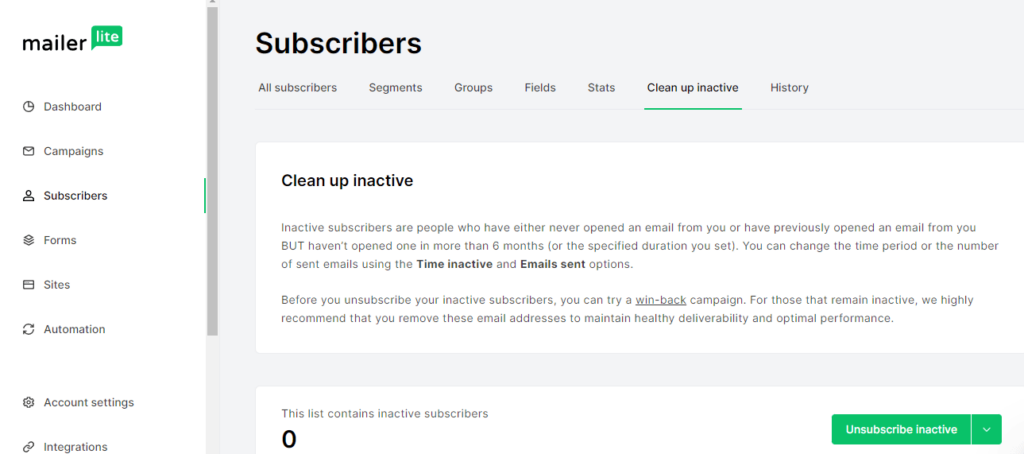
Inactive subscribers can drag down your email deliverability rates. Email providers might flag your emails as spam if they notice many unopened emails. So it's important to clean up inactive subscribers at least once every 6 months to have a healthy email list.
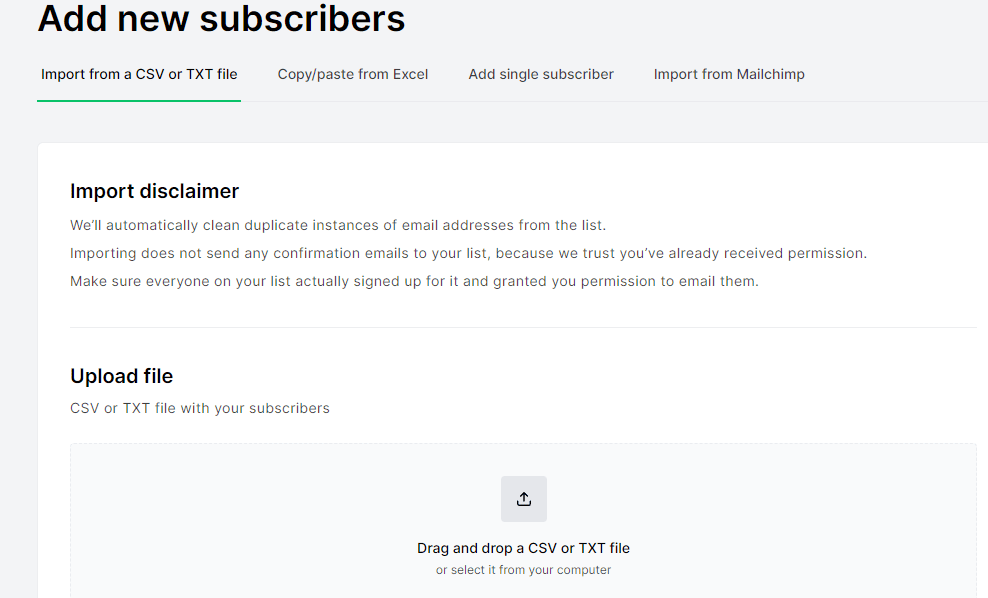
To upload subscribers, click on the "add subscribers" button, and you can either add subscribers manually or import them from a CSV/TXT file or Mailchimp.
MailerLite Forms
MailerLite forms help you collect information from your website visitors and convert them into subscribers. MailerLite forms allow you to create pop-up forms to grab your website visitors' attention based on specific triggers like time spent on a page, scrolling activity, or exit intent.
You can also create embedded forms and place these forms on your website or blog posts to collect subscribers' information. MailerLite promotional forms allow you to highlight promotions, discounts, or special offers. You can use this form to drive conversions by offering visitors an immediate incentive to subscribe. With MailerLite forms, you can grow your subscriber base, segment your audience, and gather valuable data for your email marketing campaigns.
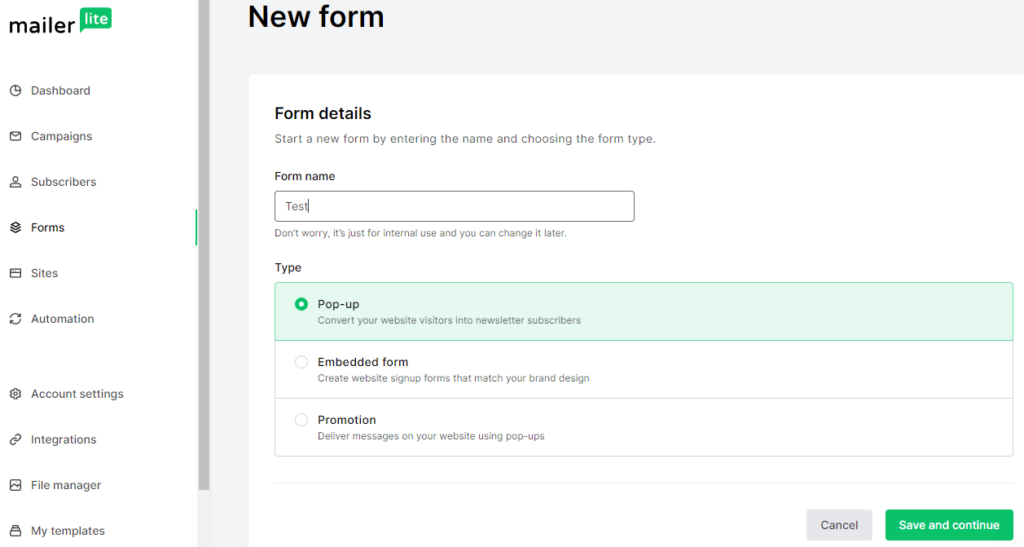
To build your email list, you can use the Forms app. Just click Forms > Create a form to get started. Choose the type you want to make, name your form, then click Save and continue.
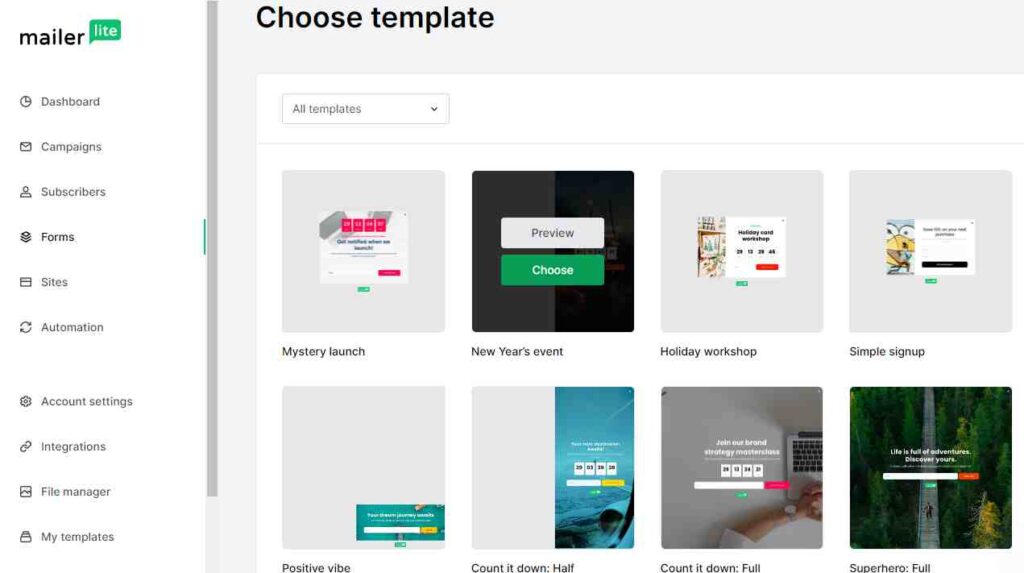
Select the subscriber groups to which you want to link your form, then choose a template. MailerLite has 24 well-crafted and responsive form templates from which you can choose.
The email editor comes with a simple drag-and-drop feature that is super easy for anyone to use. You can drag blocks for text, images, countdown timers, and social links from the right-hand side and edit the font and background in the Design tab. You can also customise the thank you page.
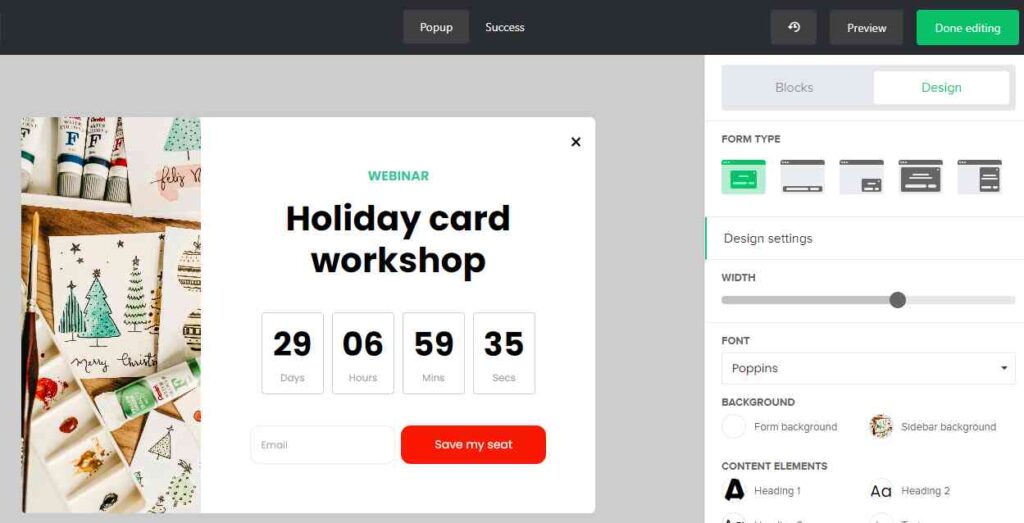
When you are satisfied with your form's editing, you can preview the form to see how it looks. Once it's okay with you, click the Done editing button to set the behaviour of the form.
You can choose when you want the pop-up form to appear on the behaviour page.
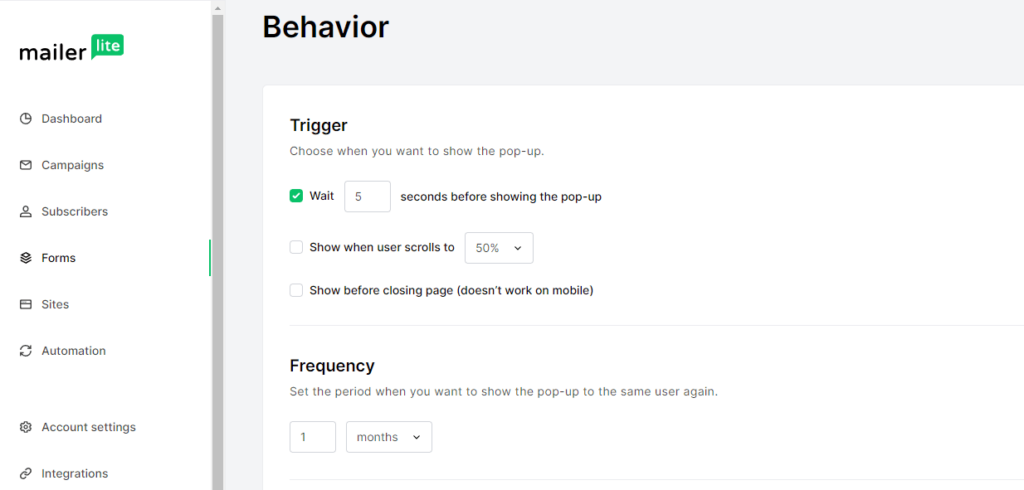
You can select the Show before closing page trigger to create an exit-intent-triggered pop-up, but the exit form won't work on Mobile.
You can choose the visibility or hide the form on a specific page of your website, and how often you want your pop-up form to display.
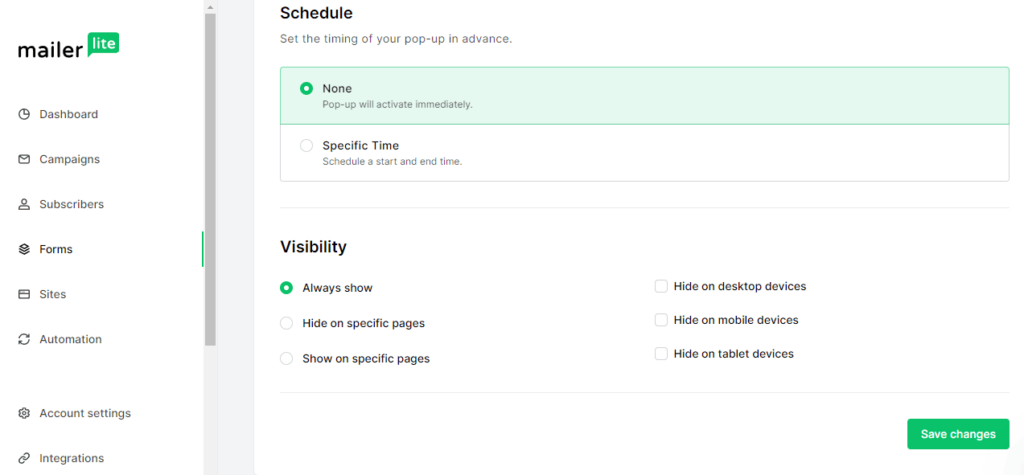
Once you have finished setting the behaviour of the form, click Save Changes and copy the tracking code snippet to be pasted on your website.
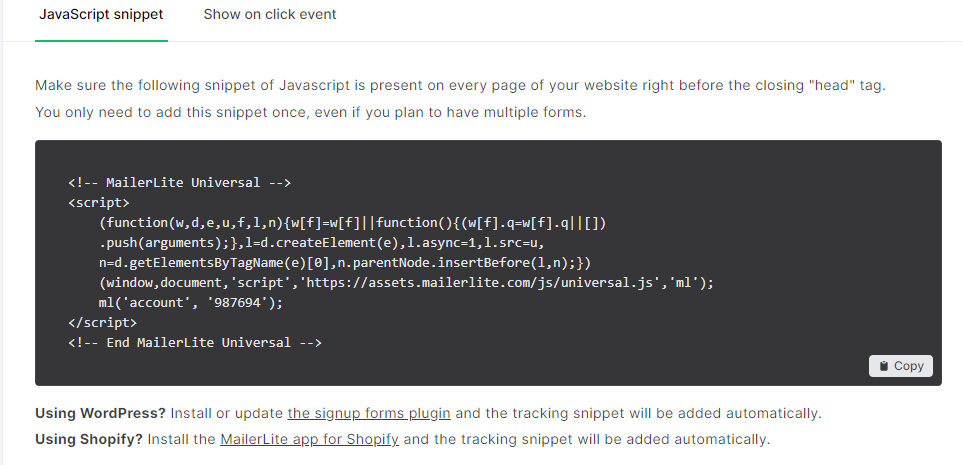
Paste the code on your website. If you are using Shopify or WordPress CMS, you can use MailerLite’s native plugins to add snippets to your account automatically.
MailerLite Sites
MailerLite is more than just a regular email marketing platform; it's a complete suite solution to power your online business. It offers a simple and effective site builder that allows you to create stunning websites and landing pages without any coding knowledge.
To build a new website or landing page, click the Sites Link on the dashboard and click Create site. Name your site and select either the landing page or the website to start building.
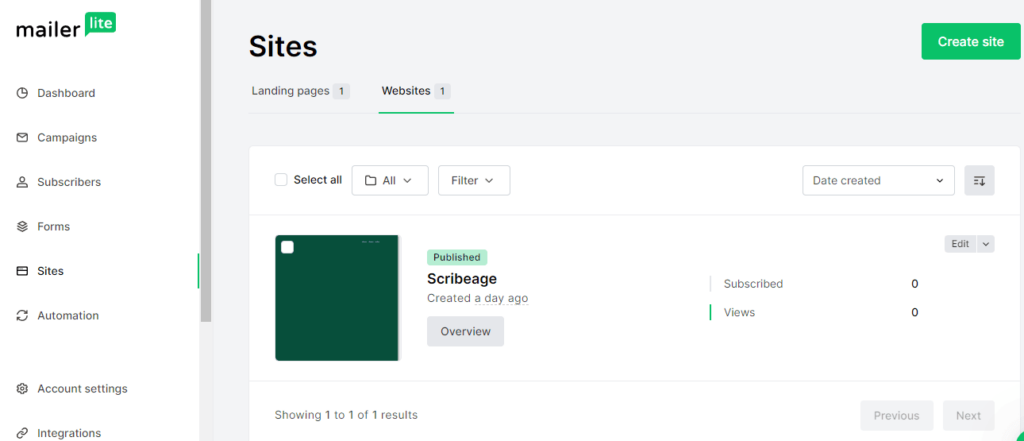
Next, you can choose a template from a bunch of well-designed templates. You have over 40 templates, which you can open up and edit or start building your site from scratch.
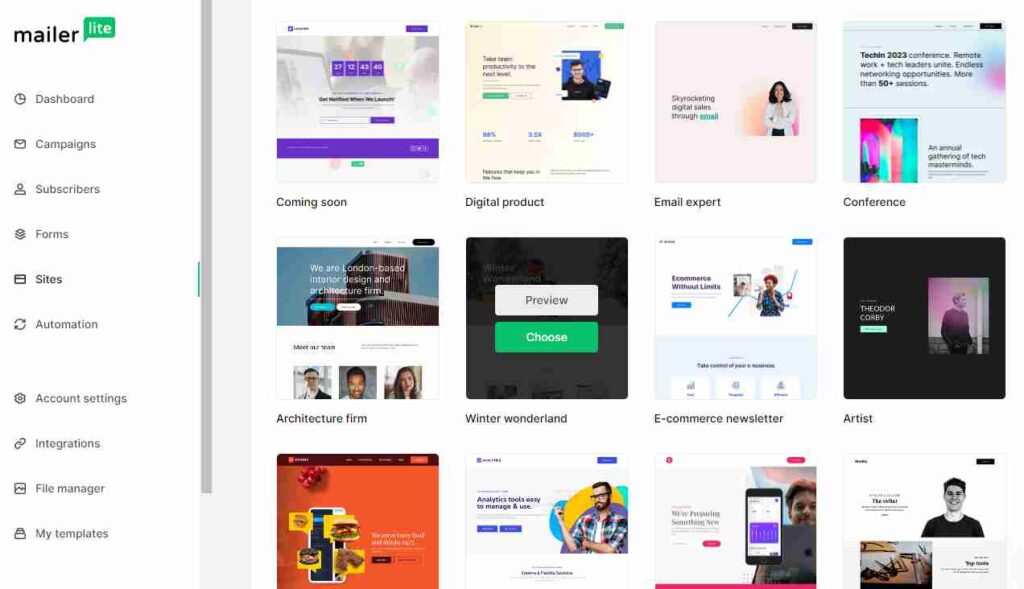
MailerLite’s drag-and-drop builder is intuitive; you can easily add and arrange content blocks like text, images, videos, and buttons. You just need to drag in blocks and layout options, rearrange and edit them in your primary website window, and change the settings, navigation, headers, and footers from the sidebar.

Once you’ve finished designing your site to your taste, the last step is to change the website settings. You can publish the site/page to a Mailerpage.io subdomain, e.g., example.mailerpage.io and connect your custom domain to create a personal URL in the paid plans.
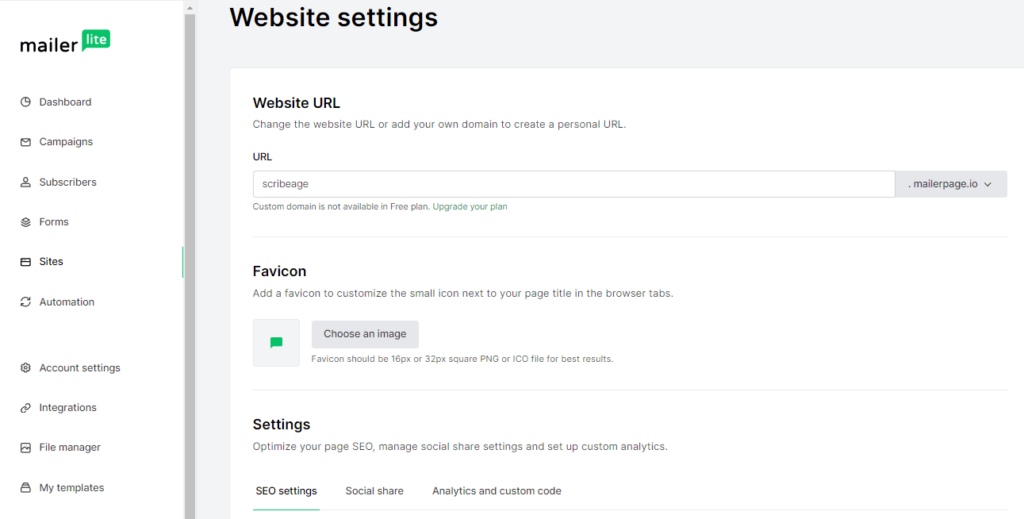
You can also optimise your MailerLite website for search engines with built-in SEO settings. You can customise meta titles, descriptions, and URLs to improve your site’s visibility on search engines.
MailerLite Automation
MailerLite’s Automation allows you to build sophisticated email marketing workflows. It helps you build stronger relationships with your audience. Whether nurturing leads, driving sales, or keeping your audience informed, Automation makes your email marketing efforts more effective and efficient.
To use the Automation tool, click Automation in the sidebar, then select New Automation.
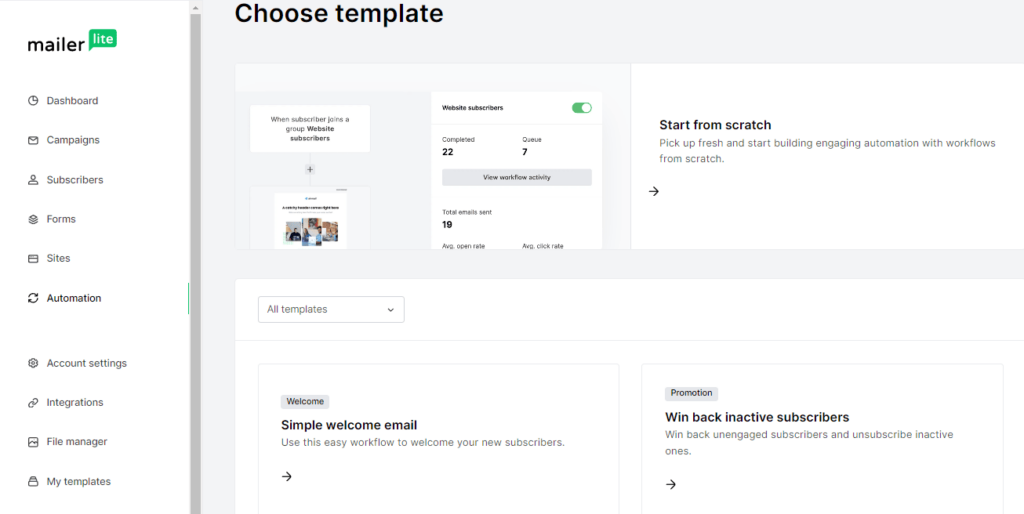
You can create comprehensive workflows to map out the entire customer journey. MailerLite's Pre-built visual templates help you see how each step connects and ensure a smooth process. Like automatically sending emails to new subscribers, introducing your brand, offering a special discount, or sharing valuable content.
You can also send personalised birthday greetings with a special offer to your customers on their birthdays or send re-engagement campaigns to target inactive subscribers with a sequence designed to win them back. You can pick templates like the welcome email, retarget subscriber, or new promotion and start building your workflow. And if no template fits your desired workflow, you can start a new workflow from scratch. MailerLite automation builder is easy to use.
You can trigger events like a new signup, a click on a link, or a purchase and set actions to determine what happens after the trigger, like sending an email, updating a subscriber’s information, or moving them to another group. You can mix and match these to create flawless workflows.
MailerLite Integrations
MailerLite integrates with various other tools and platforms, allowing you to trigger automation based on actions in your e-commerce store, CRM, or website.
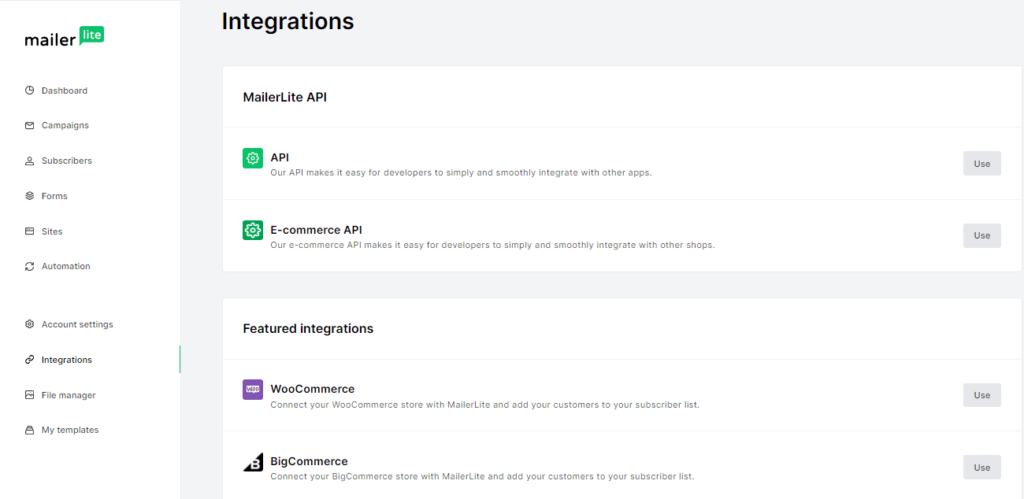
It offers a variety of integrations that can supercharge your email marketing efforts. It integrates well with tons of other platforms and tools. Here are some platforms you can integrate MailerLite with:
- Shopify
- WooCommerce
- BigCommerce
- WordPress
- Wix
- Squarespace
- Zoom
- Canva
- Eventbrite
- Thrive Leads
- Salesforce
- HubSpot
You can also sync your MailerLite account with Facebook to run targeted ad campaigns and capture leads directly from your social media platforms. With Zapier, you can connect it to hundreds of other apps and automate workflows, such as adding new subscribers from social media channels. And track the performance of your email campaigns by integrating it with Google Analytics to make data-driven decisions. You can integrate MailerLite with most platforms and tools in your tech stack to help you automate email marketing, improve customer targeting, and simplify your workflows.
MailerLite File Manager
MailerLite has a built-in File Manager to help you manage your email, landing pages, and website media library. From the File Manager, you can upload images directly from your computer or import them from various sources like a URL, Google Drive, Giphy, Unsplash, or Iconfinder. Once uploaded, you can edit your image using MailerLite's built-in design tools. The image editor is impressively advanced. It allows you to add filters, adjust levels (such as brightness and exposure), change the focus, add text, overlays, frames, and more.
MailerLite Additional Features
While we've covered the primary features of MailerLite, there are still more tools and functionalities available:
- Dynamic Content
This feature lets you personalise emails by displaying different content to subscribers based on their profile attributes. For example, you can show specific blocks to recipients based on their country or industry.
- Preference Centre
This feature allows subscribers to set their interests and preferred email frequency on advanced plans. You can send tailored content to each interest group at their preferred times.
- AI Writing Assistant
MailerLite's AI writing assistant tool uses machine learning to generate campaign copy automatically. Select your preferred tone and provide some initial prompts, and the AI takes care of the rest.
MailerLite Plans and Pricing
MailerLite offers several pricing options based on the size of your subscriber list and the features you need. There is a free plan for smaller lists, while paid plans add higher limits, advanced marketing features, and additional support options. Your monthly cost increases as your subscriber count grows.
MailerLite’s Free plan costs $0 per month and is for users who are just getting started with email marketing. It supports up to 250 subscribers and allows you to send up to 2,500 emails per month. The plan includes the drag-and-drop email editor, email automation builder, signup forms and pop-ups, analytics, A/B testing, and up to 1 landing page.
The Comfort plan starts at $10.80 per month when billed annually, although the price increases as your subscriber count grows. It includes everything available in the Free plan while removing some of the limitations that may become noticeable as your email list grows. You get unlimited monthly email sends, Unlimited templates, 50 automations, 10 websites & landing pages, 5 digital products or bookings, 10 signup forms, and the ability to remove MailerLite branding.
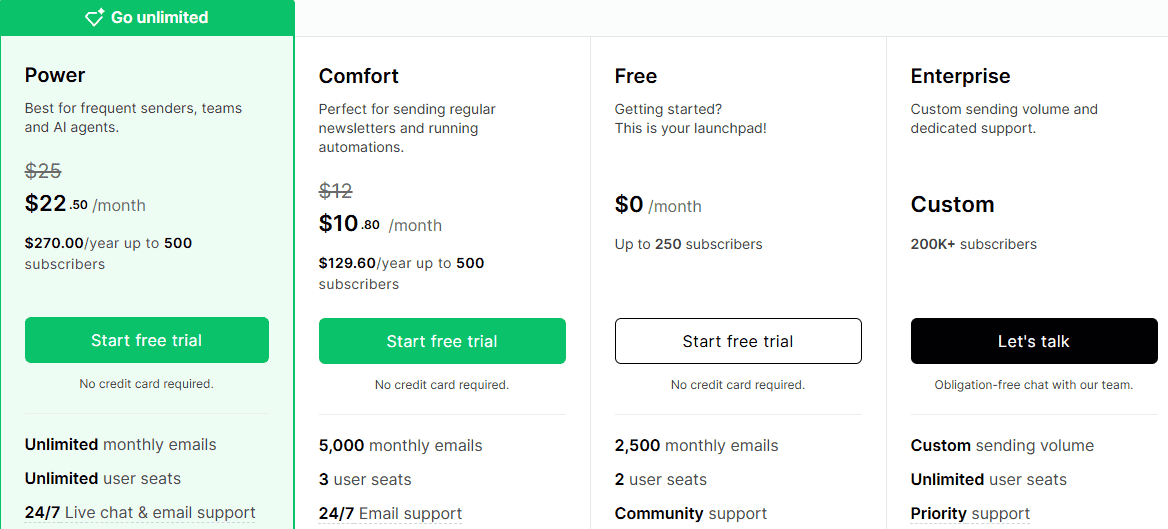
The Power plan starts at $22.50 per month when billed annually, with the price increasing based on the number of subscribers. It includes unlimited automations, unlimited landing pages, unlimited digital products & bookings, unlimited signup forms, multiple automation triggers, exclusive partner discounts and several other features for businesses running more advanced email marketing campaigns. Businesses with more than 200,000 subscribers can contact MailerLite for a custom Enterprise plan. Pricing is based on the company’s requirements and subscriber volume, with MailerLite providing a plan built around the business’s specific needs.
MailerLite Pros and Cons
Before choosing an email marketing platform, it’s crucial to consider both its advantages and drawbacks. MailerLite offers many strengths that make it a popular choice among small businesses and creators, though it also comes with a few notable limitations.
Here's a quick rundown to help you decide if it's the right fit for your business needs or not:
Pros
- User-friendly interface
MailerLite is designed with simplicity in mind; it is easy for beginners to navigate the dashboard, create campaigns, manage subscribers, and set up automations without needing technical skills.
- Affordable pricing plans
It offers competitive pricing, especially for small businesses and startups. Its free plan and low-cost entry tiers provide strong value compared to other email marketing platforms.
- Drag-and-drop email editor
The intuitive drag-and-drop builder lets you design professional-looking emails quickly by adding and arranging elements (text, images, buttons, etc.) without coding knowledge.
- Built-in landing page creator
You can create simple yet effective landing pages directly within MailerLite, eliminating the need for third-party tools for basic lead generation or campaign funnels.
- Advanced automation workflows
It supports visual automation builders that let you set up welcome sequences, behavioural triggers, and drip campaigns based on subscriber actions (e.g., sign-ups, clicks).
- E-commerce integration capabilities
It integrates seamlessly with platforms like Shopify and WooCommerce to enable you to send targeted product recommendations, abandoned cart emails, and sales updates.
- Comprehensive analytics and reporting
MailerLite provides key metrics such as open rates, click-through rates, bounce rates, and subscriber growth, allowing users to track campaign performance and optimise over time.
- Integrations with major platforms
It connects with popular tools via native integrations or Zapier, streamlining workflows across websites, CRMs, e-commerce stores, and more.
cons
- Limited Customisation in Email Templates
Although the templates are clean and responsive, advanced design customisation, such as CSS editing or precise layout control, is restricted, which limits creative flexibility.
- Automation Features Are Less Robust Than Competitors
Compared with platforms like ActiveCampaign or HubSpot, its automation capabilities are relatively basic, lacking advanced branching, conditional logic, and detailed behavioural tracking.
- No Native Social Media Posting
Unlike some competitors, it doesn’t support direct publishing or scheduling of posts on social media platforms, requiring users to rely on external tools for social marketing.
- Basic Migration Tools
Importing large contact lists or migrating from other platforms can be cumbersome due to limited data-mapping options and the absence of automated data cleanup tools.
- Strict Approval Process
New accounts undergo a strict approval process, which can delay your initial campaigns if your account is under review.
Final Thoughts on MailerLite
If you want an email marketing tool that’s affordable, simple to use, and genuinely useful, MailerLite is a solid choice. It works especially well for small businesses, bloggers, creators, and entrepreneurs who want results without paying for features they won’t use.
MailerLite makes it easy to design clean emails, grow and manage your subscriber list, and track what’s working, all without feeling overwhelmed. The free plan provides enough time to properly test the platform, while the paid plans deliver strong value as your list and requirements grow.
That said, it isn’t designed for everyone. Large teams or enterprise-level users may require advanced reporting capabilities or more advanced workflows. But for most growing businesses, MailerLite hits a sweet spot between simplicity and capability. If you’re ready to build better email campaigns without stress or bloated pricing, MailerLite is worth trying to see if it fits your workflow.
Click the button below to sign up for FREE.
Frequently Asked Questions (FAQs)
Who is MailerLite best for?
It is best for bloggers, creators, freelancers, small businesses, startups, and marketers who want an easy-to-use email marketing platform without the complexity of a full CRM. Its combination of newsletters, forms, landing pages, websites, segmentation, and automation makes it a good fit for businesses that want to manage most of their basic email marketing from one platform.
How does MailerLite’s deliverability perform?
MailerLite has a strong focus on email deliverability and provides tools and guidance for domain authentication, including SPF and DKIM. It also takes list quality seriously and does not recommend purchased email lists. However, no email platform can guarantee that every message reaches the inbox. Your sender reputation, domain authentication, list quality, engagement, and email content all influence delivery.
How good are MailerLite’s automation features?
MailerLite offers a capable visual automation builder for common workflows such as welcome sequences, lead nurturing, follow-ups, and subscriber segmentation. You can create workflows using triggers, delays, conditions, and actions without writing code. However, its automation system is less advanced than platforms built for complex marketing automation. Features such as lead scoring and deeper behavioural triggers are limited, so businesses with sophisticated customer journeys may eventually need a more advanced platform.
Can I integrate MailerLite with other tools?
Yes, it integrates with popular tools, such as Shopify, WooCommerce, BigCommerce, WordPress, Wix, Squarespace, HubSpot and over 1,000 tools through Zapier, including CRM software, webinar platforms, and e-commerce apps. With MailerLite integration, you can sync your subscriber data and streamline your workflows easily.





0 Comments