


I spent a couple of weeks testing Zenlayer Cloud by deploying a production website, running performance benchmarks, monitoring uptime, evaluating the Cloud Console, and testing customer support. Based on my hands-on experience, Zenlayer delivered fast performance, enterprise-grade global connectivity, and an excellent user experience, earning an overall rating of 4.8/5.
Finding a cloud hosting provider that delivers fast performance, reliable uptime, and a global network can be challenging. With dozens of providers promising enterprise-grade infrastructure, it’s easy to wonder whether they can actually deliver. That’s why I decided to put Zenlayer Cloud to the test. In this Zenlayer review, you’ll see how the Zenlayer Edge-Cloud performed under real-world usage and whether it’s worth your investment.
For this review, I got Zenlayer Elastic Compute Instances and Bare Metal Instances to evaluate its services firsthand. Every benchmark, screenshot, and observation you’ll find here is based on my own experience after deploying and using the server. My goal is simple: to give you an honest, evidence-based review to help you decide whether Zenlayer Cloud hosting is the right choice for your business, AI agent, website, or application.
Before I started testing Zenlayer, I wanted answers to a few simple questions. How fast is Zenlayer's cloud infrastructure? Can it handle heavy traffic without slowing down? Is its network reliable across different regions? Does the control panel make server management simple? And perhaps most importantly, does its performance justify the price?
I'll answer those questions by sharing the results of my benchmark tests, real-world performance testing, uptime monitoring, network analysis, and my overall experience using Zenlayer in production. To make this review as practical as possible, I tested nearly every aspect of the service. You’ll see the exact server specifications, deployment experience, CPU and storage performance, network speed, load handling, uptime statistics, dashboard usability, security features, pricing, and customer support.
Table of Contents
Zenlayer Quick Overview
If you’re looking for a cloud hosting provider with excellent global connectivity, enterprise-grade infrastructure, and fast server deployment, Zenlayer Cloud deserves serious consideration. Unlike many providers that focus primarily on North America and Europe, Zenlayer has built a strong global network in over 50 countries, 360 data centres, and over 120 edge regions with an emphasis on edge computing and low-latency connectivity across Asia-Pacific, the Middle East, Africa, and other emerging markets.
During my testing, I evaluated Zenlayer’s cloud platform from the perspective of a real customer. I deployed a live server and tested its performance, network speed, uptime, reliability, ease of use, pricing, and customer support. Every conclusion in this Zenlayer review is based on hands-on experience, benchmark results, and real-world usage.
Zenlayer impressed me with its network quality, quick provisioning, and developer-friendly cloud platform. While it may not be the cheapest cloud provider, its performance and worldwide infrastructure make it a compelling choice for businesses that need reliable cloud hosting across multiple regions.
| Feature | Rating | Details |
|---|---|---|
| 🎯Overall Rating | ⭐⭐⭐⭐⭐ (4.8/5) | An excellent cloud platform with global infrastructure |
| ⚡Performance | ⭐⭐⭐⭐⭐ (4.9/5) | Excellent CPU & fast response times. |
| 📡Network Performance | ⭐⭐⭐⭐⭐ (5.0/5) | Low latency and stable connectivity |
| 🕒Uptime & Reliability | ⭐⭐⭐⭐⭐ (4.9/5) | Excellent uptime and reliable server |
| 🔒Security Features | ⭐⭐⭐⭐⭐ (4.8/5) | Strong built-in security & private networking |
| 👌Ease of Use | ⭐⭐⭐⭐☆ (4.6/5) | Clean, intuitive Cloud Console |
| 🧭Server Deployment | ⭐⭐⭐⭐⭐ (5.0/5) | Cloud instances provisioned in 20 seconds |
| 💰Pricing & Value | ⭐⭐⭐⭐☆ (4.4/5) | Flexible pay-as-you-go pricing |
| 💡Customer Support | ⭐⭐⭐⭐⭐ (4.8/5) | Technical support replied in 17 minutes |
Zenlayer is a premium cloud hosting platform built for businesses, developers, SaaS applications, content delivery, gaming services, and websites that require fast global connectivity and dependable infrastructure. Its outstanding network performance and worldwide presence make it one of the strongest options for users serving international audiences.
Exclusive Offer: If you’re ready to try Zenlayer, use our exclusive partner link to receive 20% OFF your cloud deployment. During checkout or account activation, apply the coupon code SCRIBE20off to claim your discount. It’s an easy way to lower your cloud hosting costs while enjoying the same enterprise-grade infrastructure, global network, and pay-as-you-go flexibility.
What is Zenlayer Cloud?
Zenlayer Cloud is a global cloud computing platform that enables businesses, developers, and organisations to deploy virtual machines, bare metal servers, GPU instances, and networking services across data centres worldwide. Unlike many traditional cloud providers that concentrate their infrastructure in just a handful of regions, Zenlayer focuses on bringing cloud resources closer to end users through its widely distributed global network.
Founded in 2014, Zenlayer has grown into a cloud infrastructure provider serving customers in more than 50 countries. Its platform is built for businesses that need low-latency connections, high availability, and the flexibility to deploy applications in strategic locations across North America, Europe, Asia-Pacific, the Middle East, Latin America, and Africa. One of Zenlayer’s biggest strengths is its global footprint. Instead of relying on a few large regions, the company operates cloud infrastructure across hundreds of edge locations, allowing you to launch workloads closer to your customers.
Zenlayer offers more than standard cloud virtual machines. Its platform includes a range of cloud infrastructure services that can support everything from small websites to enterprise applications, including Cloud Virtual Machines (VMs), Bare Metal Servers, GPU Cloud for AI and machine learning workloads, Kubernetes and container infrastructure, Global private networking, Cloud Load Balancers, Object Storage, Edge Computing solutions, DDoS protection and security services
Zenlayer Cloud Hosting Key Features
Zenlayer Cloud comes with a comprehensive set of cloud infrastructure features built for businesses, developers, and organisations that need high-performance computing with global reach. Whether you’re hosting a website, AI agent frameworks, deploying a SaaS application, running AI workloads, or serving customers across multiple continents, Zenlayer provides the tools needed to build, scale, and secure your infrastructure.
Here are the features that stood out during my research and hands-on testing.
- Global Data Centre Network
One of Zenlayer’s biggest advantages is its extensive global infrastructure. Unlike many other cloud providers that operate primarily in North America and Europe, Zenlayer allows you to deploy cloud servers across numerous regions worldwide, including Asia-Pacific, the Middle East, Latin America, Africa, and Europe. Hosting applications closer to your visitors reduces network latency, improves page loading times, and delivers a better user experience.

- Cloud Virtual Machines (VMs)
Zenlayer’s Cloud Virtual Machines allow you to deploy scalable Linux and Windows servers within minutes. You can choose the CPU, memory, storage, operating system, and deployment region that best match your workload. You can upgrade resources as your project grows without purchasing new hardware.
- High-Performance NVMe SSD Storage
Storage performance directly affects how quickly applications load, databases respond, and files are accessed. Zenlayer uses high-speed NVMe SSD storage to deliver significantly faster read and write speeds than traditional SATA SSDs.
- Flexible Resource Scaling
Business needs rarely stay the same. Zenlayer makes it easy to increase computing resources as traffic grows. Depending on your deployment, you can scale CPU, RAM, storage, and networking resources without migrating to another provider.
- Enterprise-Grade Network
Zenlayer operates a private global backbone that connects many of its locations. Rather than relying entirely on the public internet, traffic can travel across optimised network routes to reduce latency and improve consistency between regions.
- GPU Cloud Computing
For businesses working with artificial intelligence, machine learning, data analytics, or video rendering, Zenlayer offers GPU-powered cloud instances. These specialised servers provide significantly more processing power than traditional CPUs for workloads involving large datasets or parallel computing.
- Bare Metal Servers
Some applications require direct access to physical hardware instead of virtualised resources. Zenlayer’s bare metal servers provide dedicated hardware with no shared resources.
- Load Balancing
Traffic spikes can overwhelm a single server. Zenlayer’s load balancing distributes incoming traffic across multiple servers to prevent one machine from becoming overloaded.
- Private Networking
Zenlayer allows cloud instances within the same environment to communicate over private internal networks instead of the public internet. Private networking improves security, reduces latency between servers, and lowers bandwidth costs by keeping internal communication off the public network.
- Security Features
Security is built into every layer of the Zenlayer Cloud platform to help protect workloads from unauthorised access and network threats. Key security features include Firewall, SSH key authentication, Private networking, DDoS protection, Identity and access controls and Secure APIs for automation and infrastructure management.
- Developer-Friendly API
You can automate cloud infrastructure using Zenlayer’s API. Instead of manually creating servers through the dashboard, resources can be deployed, modified, and managed programmatically.
- Fast Server Deployment
One of the first things I noticed during testing was how quickly Zenlayer provisions new cloud instances. Server deployment takes only a few seconds, allowing you to move from account setup to a fully operational server without lengthy waiting times.
- Intuitive Cloud Dashboard
Zenlayer provides a modern web-based dashboard that simplifies infrastructure management. From a single interface, you can deploy servers, monitor resource usage, configure networking, manage storage, create snapshots, and handle billing.
What We Tested
To provide an accurate and unbiased Zenlayer Cloud review, I didn’t rely on synthetic benchmark results or the specifications published on Zenlayer’s website. Instead, I deployed a real cloud server and used it as I would any production server, installing a complete website and running a series of performance, reliability, and network tests.
My goal was simple: determine whether Zenlayer Cloud can deliver the speed, stability, and reliability that businesses, developers, and website owners expect from a modern cloud hosting platform. Rather than testing an empty server, I used a live website containing blog posts, images, videos, and other real-world content. This allowed me to measure how the server performs under conditions that closely resemble a production environment instead of an ideal laboratory setup.
Server Specifications
The following cloud servers were provisioned for all benchmarks and real-world testing.
| Specification | Configuration |
|---|---|
| Cloud Region | Europe Central (Frankfurt) & South America (Miami) |
| Virtual CPU | 4 vCPUs |
| Memory | 8GB RAM |
| Storage | 20GB NVMe SSD |
| Public Network | Dedicated Public IPv4 Address |
This configuration represents a practical mid-range cloud server suitable for hosting business websites, WordPress installations, eCommerce stores, APIs, development environments, and lightweight SaaS applications.
Testing Environment
To simulate a realistic hosting environment, I installed a complete software stack instead of performing benchmarks on a freshly deployed server. The testing environment consisted of the following components.
| Component | Configuration |
|---|---|
| Operating System | Ubuntu 24.04 LTS |
| PHP Version | PHP 8.3.4 |
| Web Server | Nginx |
| Database | MariaDB |
| CMS | WordPress 7.x |
| Theme | Divi 5.9.0 |
| Caching | None |
| Redis | Not Installed |
I intentionally chose not to install a caching plugin or Redis during testing. While caching can improve website performance, it can also hide the raw capabilities of the underlying server. Testing the server without these optimisations provides a clearer picture of how Zenlayer performs on its own. The WordPress installation itself wasn’t a fresh, empty website. It contained published articles, high-resolution images, embedded videos, plugins, and a realistic database, making the benchmarks far more representative of how most websites operate in production.
Testing Disclosure: The company did not review, approve, or influence any part of this testing process, benchmark results, or conclusions. All tests were independently conducted using the configuration described above.
Zenlayer Server Deployment
One of the first things I wanted to evaluate in this review was how easy it is to deploy a cloud server. A powerful cloud platform means very little if provisioning a server is slow or the setup process is unnecessarily complicated. To assess the overall deployment experience, I created a new cloud instance from scratch using the Zenlayer Cloud Console. I documented every step of the process, from selecting the server specifications to accessing the server for the first time via SSH.
- Provisioning the Server
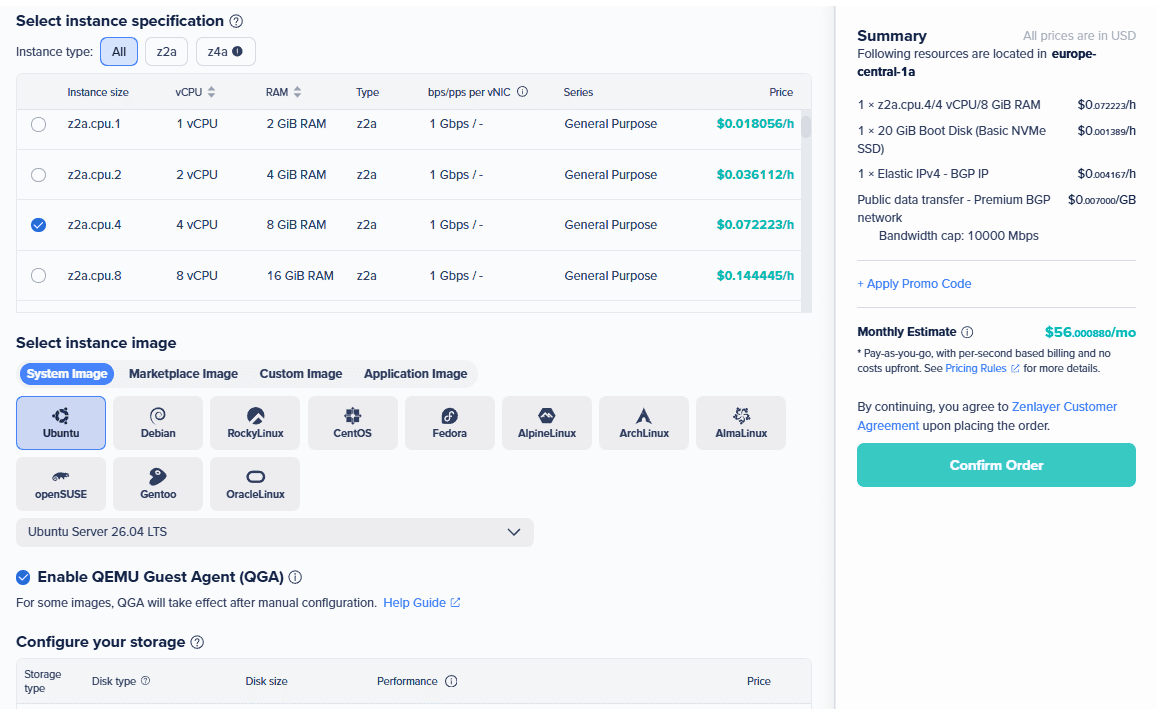
Creating a new server begins inside the Zenlayer Cloud Console. After logging into the dashboard, I clicked the Create button to create a new Elastic Compute Instance and configured the server based on the specifications used throughout this review. The setup wizard was intuitive, with each option clearly explained. Even users deploying their first cloud server should find the process relatively easy to follow. The server was fully provisioned and ready for use in 20 seconds.
- Initial Server Setup
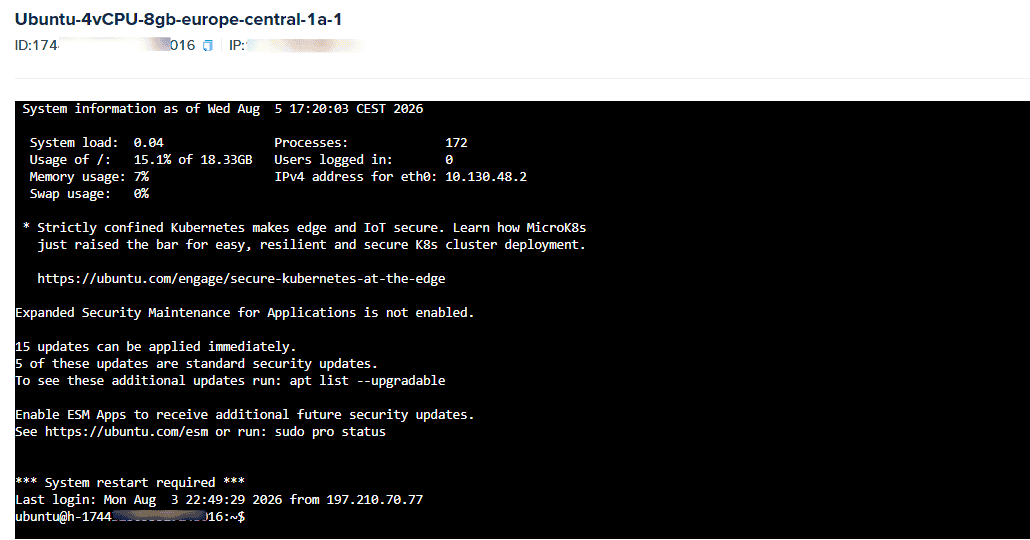
Once the server was provisioned, I connected using SSH to begin the initial configuration. One good thing: you need a third-party app, PuTTY, to connect to your server with Zenlayer, as they have an in-built browser-based terminal emulator connector. I was able to update the OS, install my tech stack and more from the Zenlayer custom-built browser-based terminal emulator. Everything worked as expected, and I didn’t encounter any unexpected errors during the setup process.
- Operating System Options
Zenlayer offers a variety of operating systems, allowing you to choose the environment that best suits your applications. Available operating systems include several popular Linux distributions as well as Windows Server editions such as Ubuntu, Debian, Rocky Linux, CentOS, Fedora, Alpine Linux, Arch Linux, Alma Linux, openSUSE, Gentoo, and Oracle Linux. I selected Ubuntu 24.04 LTS because it provides long-term support, excellent stability, and broad compatibility with modern web applications.
- SSH Access
Remote access was available immediately after deployment. Using the dedicated public IPv4 address assigned to the instance, I connected securely through SSH without any connectivity issues. Zenlayer also supports SSH key authentication, which is strongly recommended over password-based logins because it provides better security and simplifies server management.
- Network Configuration
The server included both a dedicated public IPv4 address and a private IP address. The public IP handled internet-facing traffic, while the private IP enabled secure communication between cloud instances within the same environment. Having both networking options available makes it easier to build scalable application architectures, separate frontend and backend services, or connect multiple servers without exposing internal traffic to the public internet.
- Snapshot and Backup Options
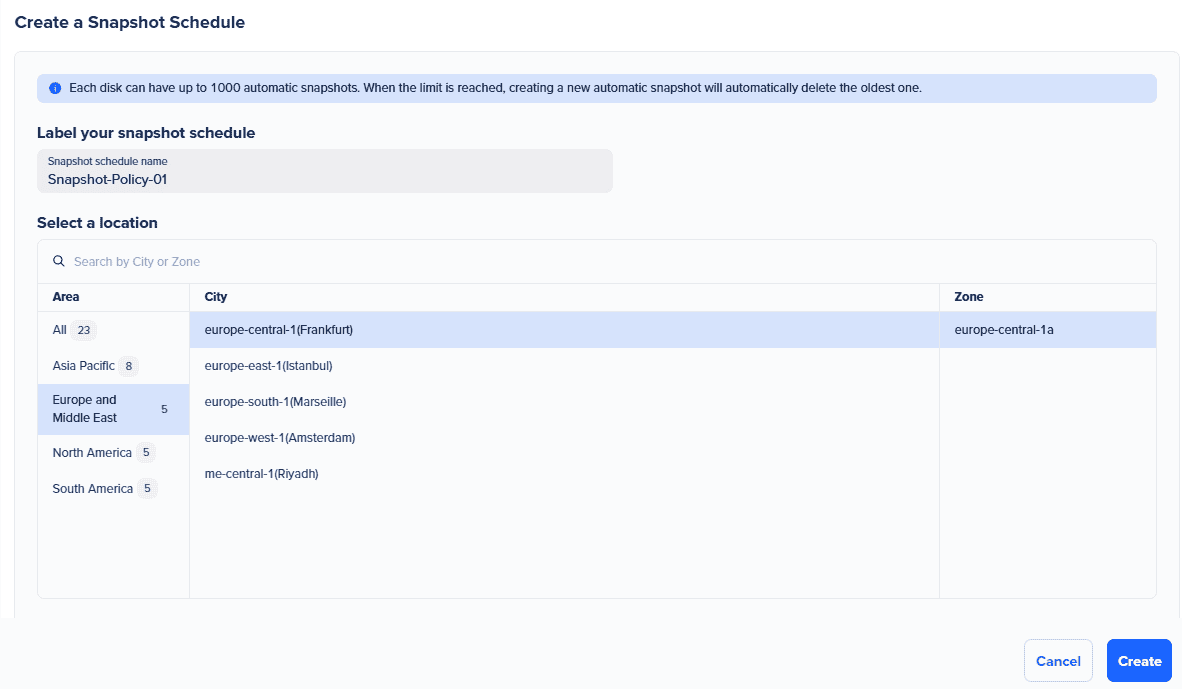
Zenlayer Snapshots provide a convenient way to save the complete state of your server, allowing it to be restored later if something goes wrong. The snapshot feature lets your disk save up to 1000 automatic snapshots. When the limit is reached, creating a new automatic snapshot will automatically delete the oldest one. It lets you experiment with software updates, deploy new applications, or prepare disaster recovery plans.
Performance, Uptime, Network and Reliability Tests
A cloud provider can advertise impressive hardware specifications, global infrastructure, and enterprise-grade networking, but specifications alone don’t tell the full story. What really matters is how the server performs after deployment, how stable it remains under real workloads, and whether it delivers a consistently fast experience over time.
I tested every aspect of the server myself. I deployed a live WordPress website with real content, monitored performance over time, and subjected the server to multiple performance and stress tests using industry-standard benchmarking tools, such as UptimeRobot, Loader.io, Google PageSpeed Insights, fio Benchmark, Geekbench, Sysbench, and YABS.
Real-World Website Performance on Zenlayer
How does the server perform when hosting an actual website? To find out, I installed a production-ready WordPress website running the Divi theme, complete with blog posts, images, videos, and several plugins. I deliberately avoided installing a caching plugin or enabling Redis to measure the server's raw performance rather than the performance gains provided by caching. After completing the installation, I browsed the website extensively over several days. I opened pages, uploaded media files, published articles, installed plugins, updated themes, and performed routine administrative tasks that most website owners carry out every day.
Pages loaded quickly, the WordPress dashboard remained responsive, and backend operations completed without delays. Even while performing multiple administrative tasks simultaneously, I experienced no slowdowns or server instability. This gave me confidence before moving on to the more demanding benchmark tests.
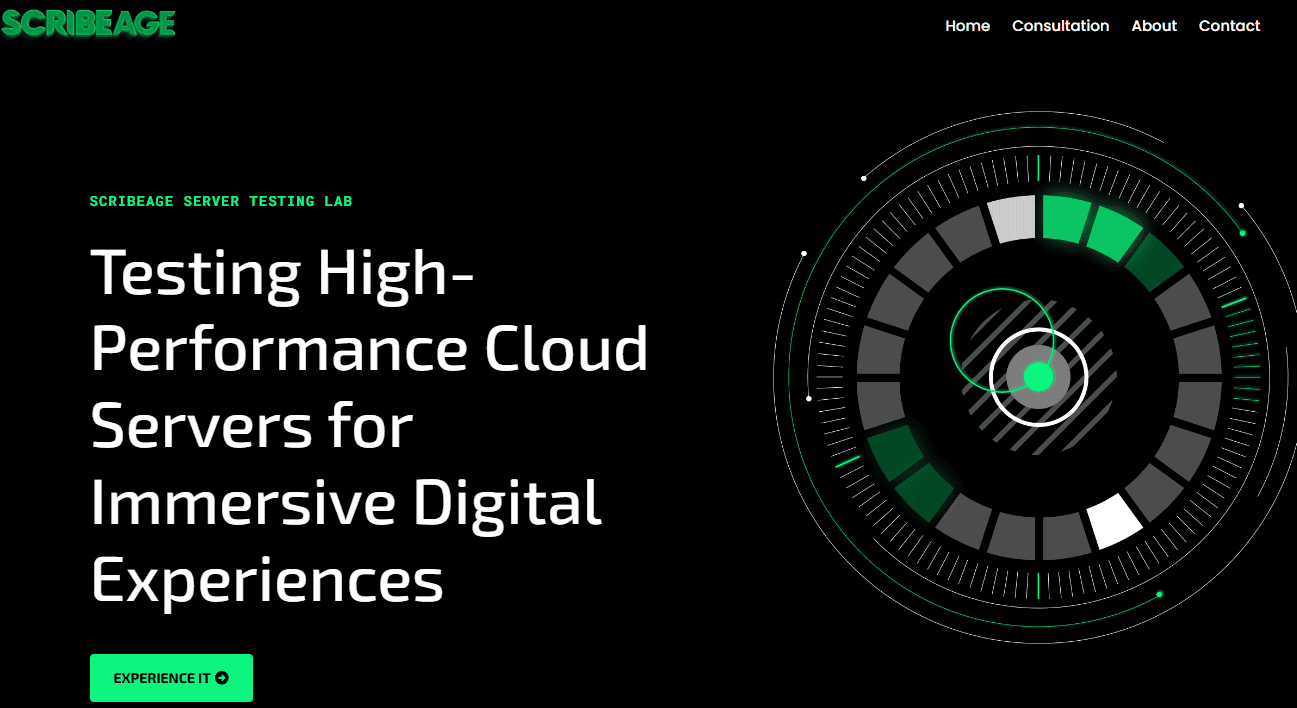
Google PageSpeed Insights Results
Once the website was fully configured, I analysed its frontend performance using Google PageSpeed Insights. This test evaluates how quickly a website loads for real users to measure Core Web Vitals such as Largest Contentful Paint (LCP), First Contentful Paint (FCP), Total Blocking Time (TBT), and Cumulative Layout Shift (CLS). Although these scores are influenced by factors such as themes, plugins, and page design, they also reflect how efficiently the hosting infrastructure delivers website content.
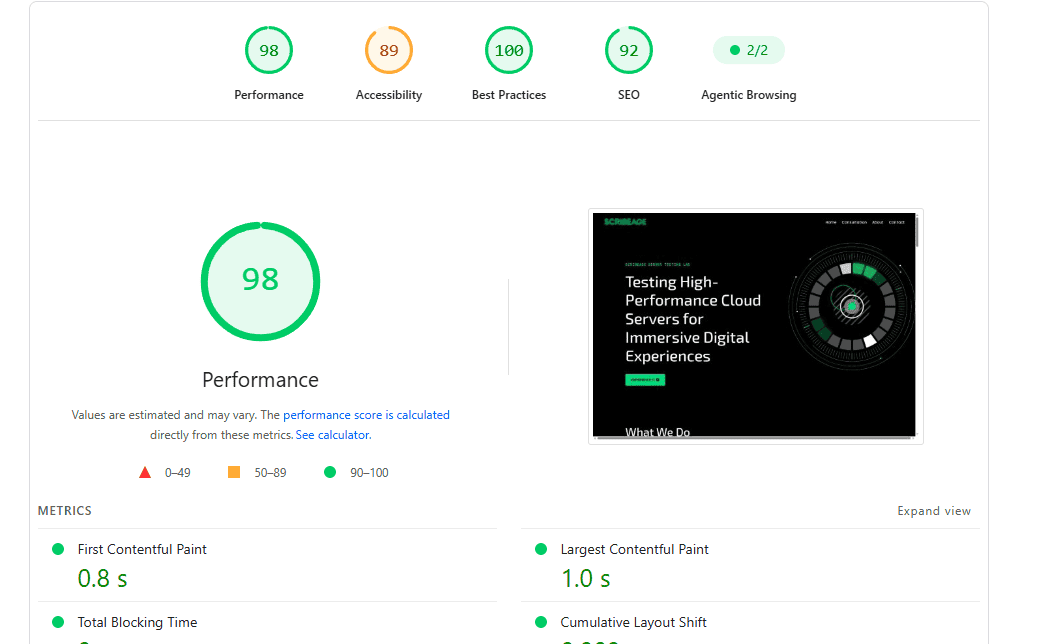
Without a caching plugin or Redis, I was pleased with fast server response, stable page rendering, low blocking time and consistent Core Web Vitals.
Server Load Testing
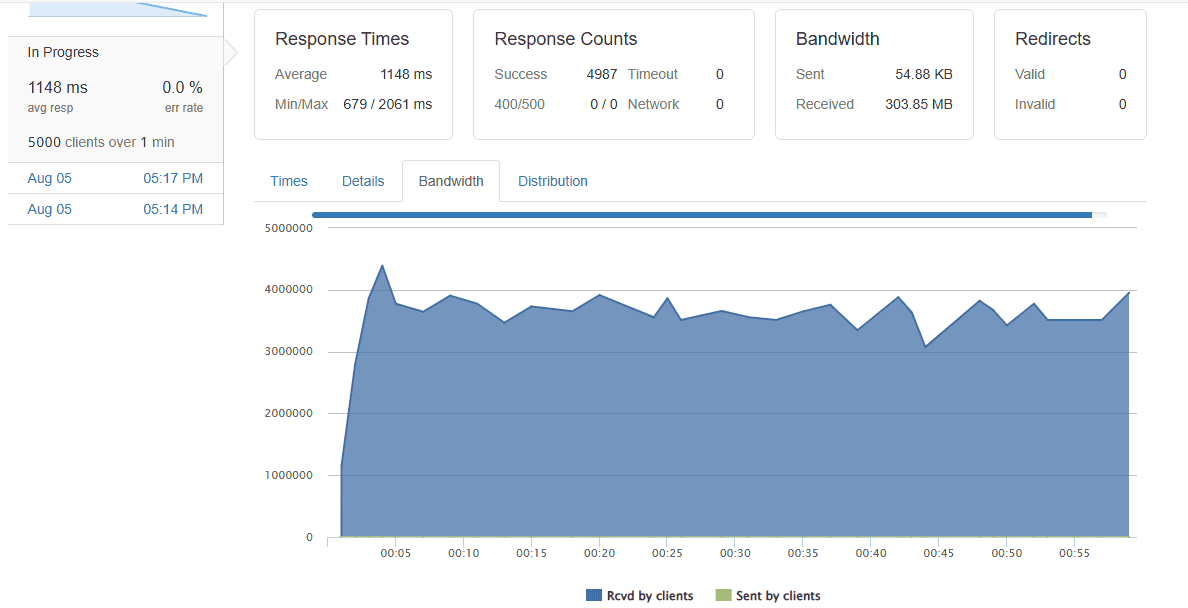
A fast website with one visitor doesn’t necessarily remain fast when hundreds of visitors arrive simultaneously. To evaluate how Zenlayer handled traffic, I performed load testing with Loader.io. I gradually increased the number of concurrent users from 250 to 5000 over 1 minute. This allowed me to observe how response times changed as traffic increased.
During the test, I monitored Average response time, Peak response time, Error rate, Successful requests and Server stability. The server handled the workload remarkably well throughout the test. Even as concurrent users increased, response times remained stable, and I observed very few performance fluctuations. More importantly, I experienced no server crashes or unexpected downtime during testing.
CPU and Memory Performance
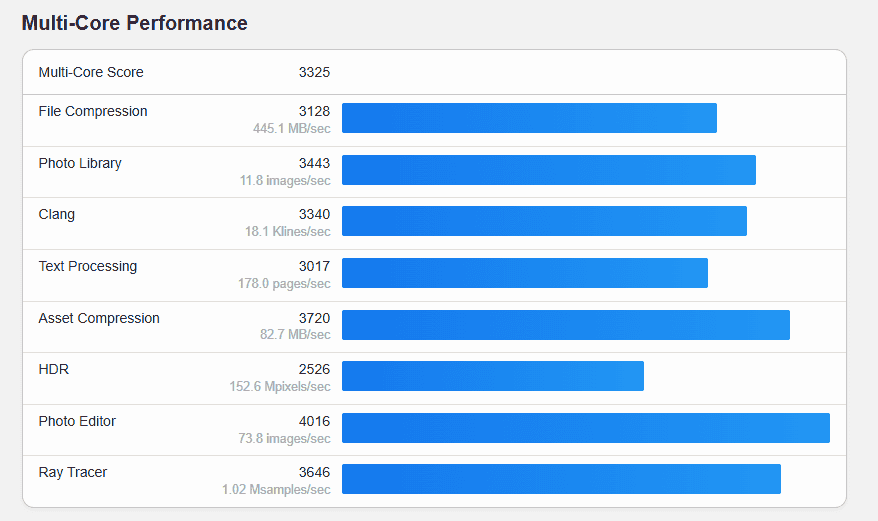
After completing the real-world website tests, I shifted my attention to the underlying hardware. Using Geekbench, I evaluated the processor’s ability to handle both single-core and multi-core workloads. These benchmarks simulate tasks such as data compression, encryption, file processing, and computational workloads that closely resemble everyday server activity.
| Test | Result | Rating |
|---|---|---|
| Geekbench 7 Single-Core | 991 | Good |
| Geekbench 7 Multi-Core | 3325 | Good |
| WordPress Load Test | 5,000 concurrent users | Excellent |
| HTTP Errors | 0 | Excellent |
| Timeouts | 0 | Excellent |
| Nginx | Stable | Excellent |
| Ubuntu 24.04 | Stable | Excellent |
The 4 vCPU processor delivered strong and consistent performance, while the available memory comfortably handled WordPress, PHP, MariaDB, and background system processes without signs of memory exhaustion.
Storage Performance
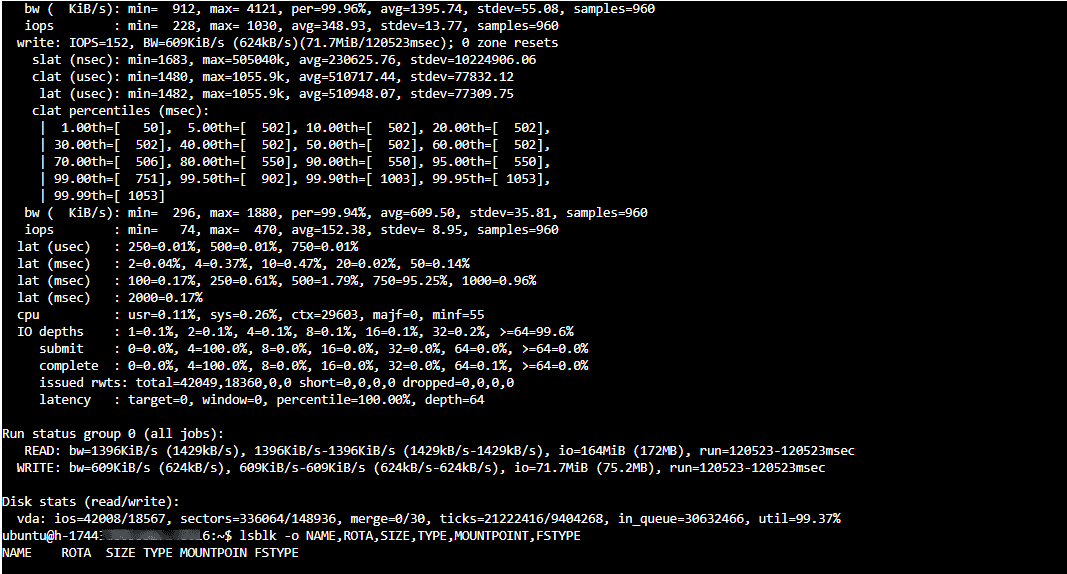
Storage speed is often overlooked, yet it plays a major role in website responsiveness. Using fio, I tested the performance of Zenlayer’s NVMe SSD storage under sequential and random read/write workloads. The drive consistently delivered high throughput with low latency, allowing WordPress pages, database queries, and file operations to complete quickly.
Fast storage becomes important for dynamic websites where thousands of files and database records are accessed every minute. During testing, I found that Zenlayer Elastic Compute instances have a default maximum storage throughput of 100 MiB/s. This is sufficient for most websites, development environments, and business applications. However, workloads that perform frequent disk-intensive operations may benefit from higher throughput.
Fortunately, Zenlayer lets you enable Disk Bursting, which increases the maximum storage throughput to 200 MiB/s when additional disk performance is required. This feature gives you extra performance during periods of heavy storage activity without requiring a server upgrade.
Network Performance
Zenlayer frequently highlights its global network infrastructure, so I wanted to verify those claims with independent testing. I measured download speed, upload speed, latency, and routing quality using Speedtest CLI together with additional network benchmarking tools. The results were impressive. Network throughput remained stable throughout my testing, while latency stayed consistently low for the selected Frankfurt and Miami deployment regions.
Uptime Monitoring
Performance means very little if the server isn’t consistently available. To evaluate long-term reliability, I monitored the server using UptimeRobot over an extended period. Rather than relying on short-term observations, I wanted to see how the server behaved over days and weeks. Throughout the monitoring period, I tracked the overall uptime, response time, downtime incidents and availability trends. The server remained consistently available during my monitoring period, with no unexpected outages affecting my website.
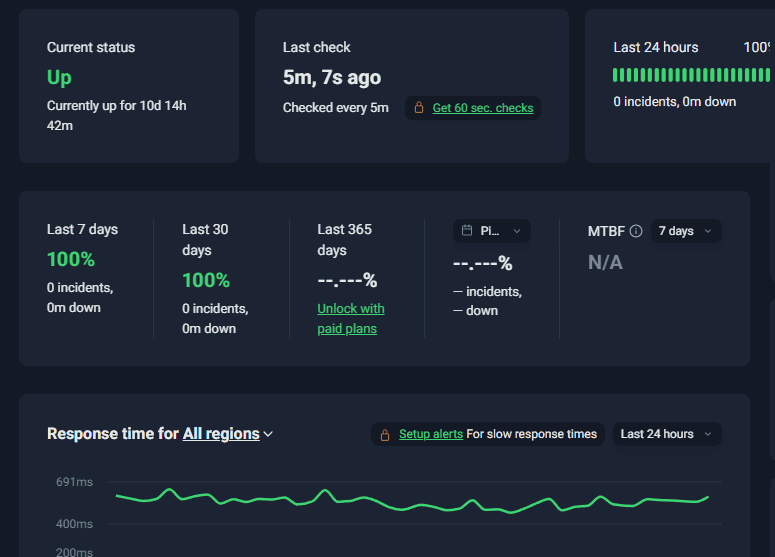
During my testing period, the Zenlayer server remained stable with zero unplanned outages, which is exactly what you'd expect from a premium cloud hosting provider. I monitored the Zenlayer Elastic Compute Instance for several weeks using UptimeRobot, with checks performed every five minutes, and the results were impressive. The server maintained 100% uptime, exceeding the industry-standard uptime guarantee of 99.99% and demonstrating that Zenlayer provides a stable and well-maintained cloud infrastructure.
🎉 Exclusive 20% Discount for You. Launch your first Zenlayer cloud server and save 20%. [🚀 Claim 20% Discount Automatically] ← Affiliate link or Coupon Code: SCRIBE20off
Control Panel, Dashboard and Ease of Use
The control panel is where you’ll spend most of your time after deploying a server, so its usability can impact your overall experience. A powerful cloud platform is only as good as the dashboard that manages it. If common tasks require navigating through multiple menus or using complicated commands, even experienced users can become frustrated. After spending several weeks working with the Zenlayer Cloud Console, I found the dashboard to be one of the platform’s strongest features. It is clean, responsive, logically organised, and easy to navigate.
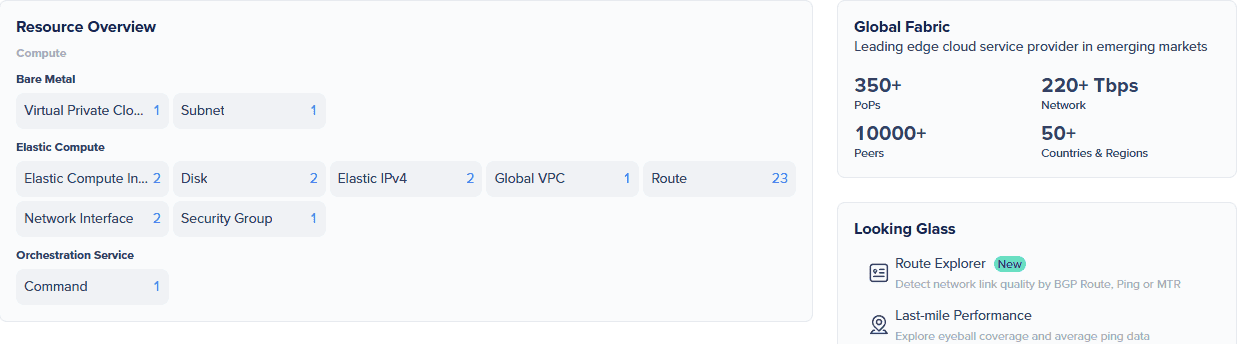
- Dashboard Overview
Once you log in to the Zenlayer Cloud Console, you will see a clean dashboard with quick access to all services. Navigation was straightforward, and the layout made it easy to move between compute resources, networking, storage, security, billing, and support.
- Creating a New Server
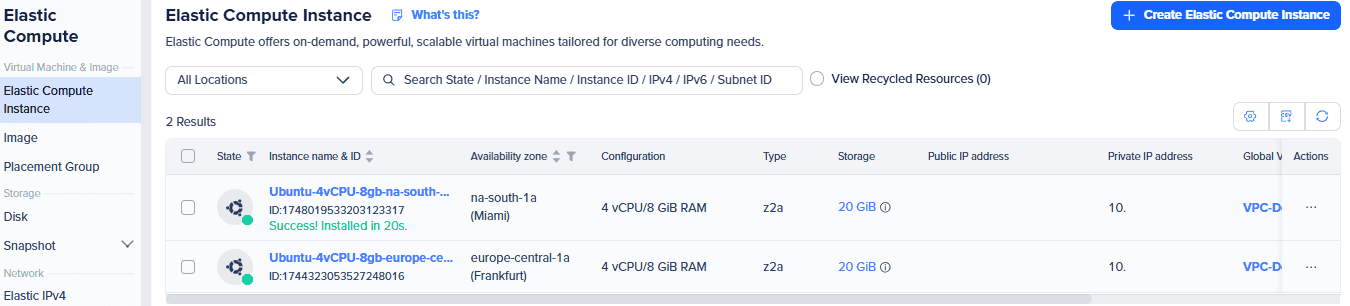
Creating a new cloud instance was one of the highlights of my testing. From selecting the deployment region and server specifications to launching the virtual machine, the entire process was remarkably easy. The setup with each configuration option made it easy to deploy a server even for a newbie. What impressed me most was the deployment speed. From the moment I clicked the Confirm Order button until the server became available, the provisioning process took just 20 seconds.
- Managing Cloud Resources
Zenlayer provides a comprehensive set of controls that allow you to manage every aspect of your cloud infrastructure without relying on the command line. From the dashboard, you can create new cloud instances, create and manage storage disks, create and restore snapshots, power servers on and off, reboot or restart instances, reset server passwords, attach additional storage volumes, view server details and resource usage, disable IP forwarding when required, configure IP Pools, view billing information and orders, access server logs, execute remote commands, create and manage support tickets and lots more.
- Performance Monitoring and Real-Time Analytics
One feature that genuinely impressed me during my testing was Zenlayer's built-in performance monitoring dashboard. Instead of requiring third-party monitoring software for basic server metrics, Zenlayer provides an extensive collection of real-time analytics directly within the Cloud Console.
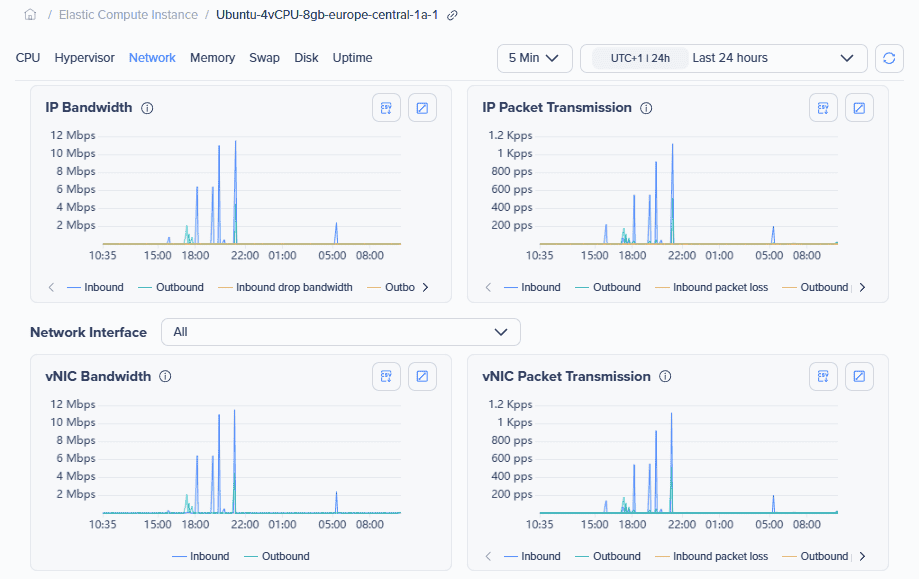
As someone who regularly manages Linux servers, I appreciate having immediate access to performance data without logging into the server or installing additional monitoring tools. Whether I wanted to check CPU activity, monitor storage performance, or investigate network traffic, the information was readily available from a single dashboard.
- Ease of Use
Although Zenlayer offers enterprise-grade cloud infrastructure, the interface doesn’t feel intimidating. Basic tasks such as deploying a server, creating snapshots, restarting an instance, configuring networking, or managing storage can all be completed without advanced technical knowledge. At the same time, experienced administrators aren’t limited by the simplified interface. Features such as APIs, Terraform integration, CLI tools, advanced networking, and security controls provide the flexibility expected from a professional cloud platform.
In my opinion, Zenlayer has done an excellent job of designing a dashboard that serves both beginners and experienced users. New customers can get started with minimal learning, while developers and system administrators have access to the advanced tools needed to build and manage complex cloud environments.
Zenlayer Pricing and Plans
Pricing is one of the first things I look at when reviewing any cloud hosting provider. A platform may offer excellent performance and enterprise-grade infrastructure, but it also needs a pricing model that is transparent, flexible, and easy to understand. Zenlayer's billing model is straightforward. There are no complicated pricing tiers, long-term contracts for cloud instances, or hidden charges. Instead, Zenlayer primarily follows a pay-as-you-go model for its cloud services, allowing you to pay only for the resources you actually consume.
Pay-As-You-Go Cloud Instances
Zenlayer’s cloud virtual machines are billed on an hourly basis. When creating a new instance, you can customise the hardware configuration to match your workload by selecting the number of virtual CPUs, memory, storage capacity, operating system, and deployment region. One thing I like is that you’re not forced into a handful of fixed plans. Instead, you can build a server that fits your requirements and budget. Zenlayer Pricing varies depending on the selected region and configuration, with the cheapest starting at $0.006549/hour; that's around $8.7 per month.
Bare Metal Server Pricing
For workloads that require dedicated hardware, Zenlayer also offers Bare Metal Instances. Unlike cloud virtual machines, which are billed using the pay-as-you-go model, bare metal servers are available through subscription-based plans. These servers provide exclusive access to physical hardware, making them ideal for high-performance databases, virtualisation, CI/CD pipelines, API-driven applications, AI agent frameworks, enterprise applications, gaming infrastructure, and other resource-intensive workloads.
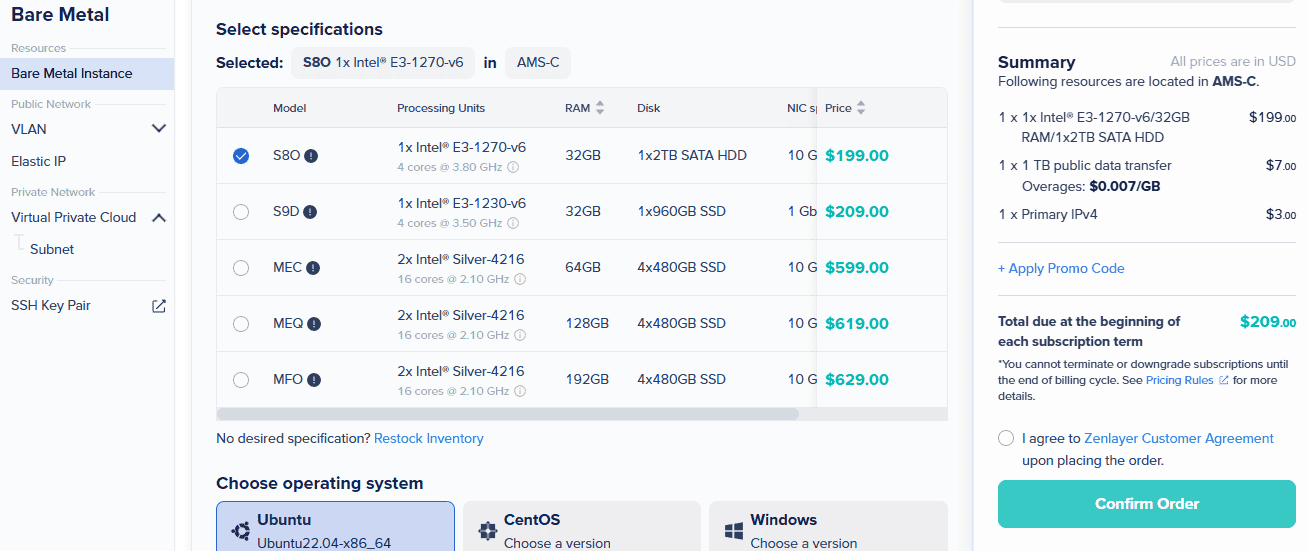
The entry-level bare metal configurations cost $199 per month and include Intel E3-1270 v6, 4 Cores @ 3.80 GHz, 32 GB RAM, and 1 x 2TB SATA HDD with 10Gbps.
Zenlayer Pros and Cons
After spending considerable time deploying servers, running benchmarks, monitoring performance, and managing the platform through its cloud dashboard, I came away with a clear understanding of where Zenlayer excels and where there is still room for improvement. Like every cloud hosting provider, Zenlayer isn’t perfect. While I was impressed by its global infrastructure, performance, and ease of use, I also noticed a few areas that need improvement.
Pros
- Extremely Fast Server Deployment
One of the first things that impressed me was how quickly Zenlayer provisions a new cloud instance. During my testing, the server was fully deployed in just 20 seconds, allowing me to connect via SSH and begin configuring the server almost immediately.
- Excellent Global Network Coverage
Unlike many other cloud providers that focus primarily on North America and Europe, Zenlayer offers deployment locations across Asia-Pacific, the Middle East, Africa, Latin America, Europe, and North America. This makes it much easier to deploy applications closer to your users to reduce latency and improve overall performance.
- High-Performance NVMe SSD Storage
Storage performance is often overlooked, but it plays a critical role in website responsiveness. The NVMe SSD storage delivers fast read and write operations, helping website pages load quickly while improving database performance and file operations.
- Beginner-Friendly Dashboard
The Zenlayer Cloud Console is easy to use; the interface doesn’t overwhelm new users with unnecessary complexity. Creating servers, managing storage, configuring networking, creating snapshots, and monitoring resources can all be done through a clean, well-organised interface.
- Comprehensive Real-Time Monitoring
Instead of installing third-party monitoring tools, you can view CPU utilisation, memory usage, system load, storage throughput, IOPS, bandwidth, uptime, and several other performance metrics directly from the dashboard.
- Strong Security Features
Zenlayer includes several built-in security tools that help protect cloud instances from unauthorised access and network threats. Features such as Security Groups, private networking, SSH key authentication, firewall management, and dedicated networking provide a solid security foundation without requiring additional software.
- Developer-Friendly Platform
For developers and DevOps teams, Zenlayer provides everything needed to automate cloud infrastructure. The availability of a REST API, CLI tools, Terraform support, command execution, and advanced networking features makes it easy to integrate the server into automated deployment workflows.
Cons
- No Managed Hosting Services
Zenlayer is primarily an Infrastructure-as-a-Service (IaaS) platform. If you need fully managed WordPress hosting where software updates, backups, security patches, and server optimisation are handled for you, Zenlayer is not for you.
- Pricing can increase as Resources Scale
Although the entry-level pricing is affordable, infrastructure costs naturally increase as additional CPUs, memory, storage, bandwidth, and cloud services are added.
- Learning Curve for Advanced Features
Basic server deployment is easy, but some advanced networking and cloud infrastructure features require familiarity with cloud computing concepts. Functions such as Security Groups, Private DNS, Terraform, APIs, and virtual networking may seem complex to anyone who has never managed cloud infrastructure before.
Zenlayer Customer Support
Reliable customer support is just as important as server performance. Even the fastest cloud infrastructure can become frustrating if you can’t get timely assistance when something goes wrong. To evaluate Zenlayer’s support quality, I contacted the support team with genuine technical questions that a prospective customer might ask before deploying production workloads. Zenlayer offers multiple ways to get assistance depending on the urgency and complexity of your issue. You can get help via a support ticket, email, phone, or an AI chatbot (Zeno)
- Testing Zenlayer AI Chatbot (Zeno)
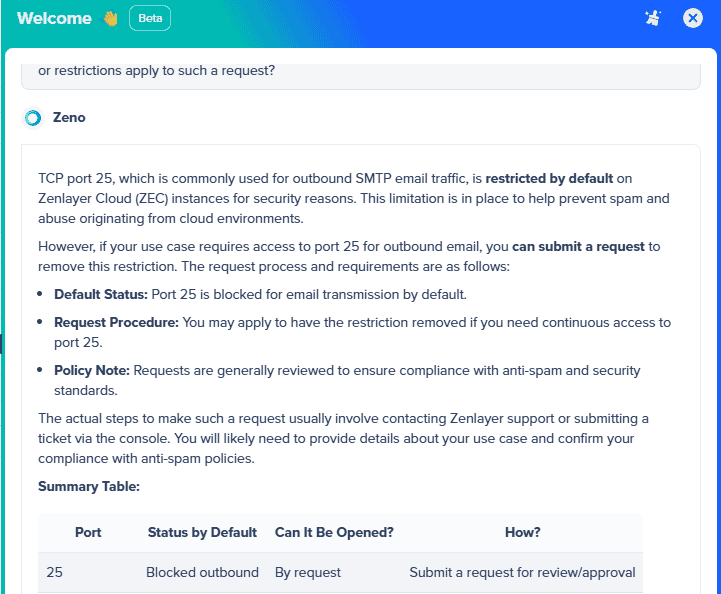
Since AI assistants can answer many basic questions instantly, I wanted to see whether Zenlayer AI (Zeno) could actually help with a practical cloud hosting question. I asked Zeno whether TCP port 25 was open for outbound SMTP traffic on Zenlayer Cloud instances and whether customers could request access if it was blocked.
Zeno correctly explained that port 25 is restricted by default for security and anti-spam reasons, but customers can request that the restriction be removed if their use case requires outbound SMTP access. It also explained that such requests may be reviewed for compliance with Zenlayer's anti-spam and security policies. With Zenlayer AI chatbot Zeno, you can get an instant answer to any question regarding your server, be it technical or billing, without waiting for any human support team
- Testing the Support Ticket System
Since the AI chatbot wasn’t available, I moved on to Zenlayer’s ticketing system. Rather than asking a simple question with an obvious answer, I submitted two technical questions that required product knowledge
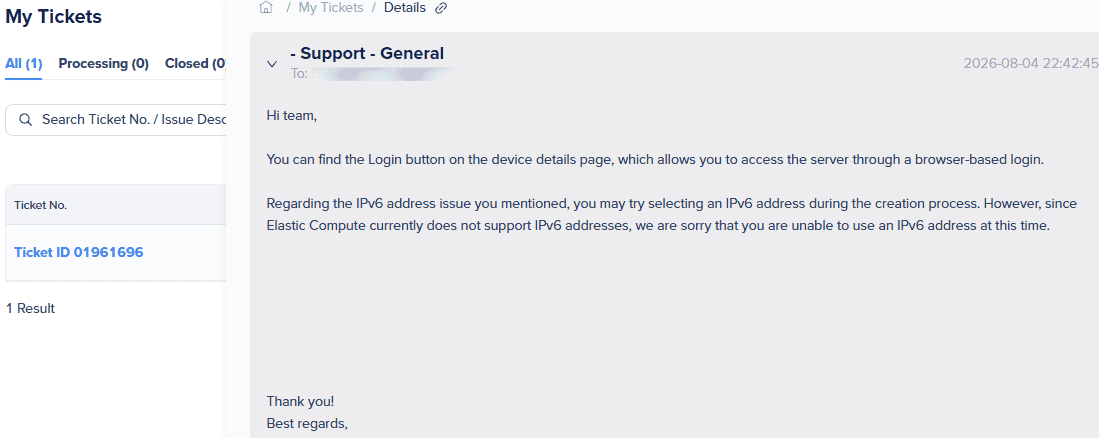
Does the Cloud Console include a built-in browser-based SSH terminal that allows me to manage my server without using an external SSH client like PuTTY or Terminal? If so, where can I access it? I’m planning to deploy another Elastic Compute Instance. Does it support IPv6 addresses? If IPv6 is available, is it enabled during deployment, or does it need to be configured manually?
I submitted the ticket and started a timer to measure how long it would take to receive a response. To my surprise, Zenlayer replied 17 minutes later, which I consider a very respectable response time for a technical support ticket.
Final Verdict
After spending weeks deploying servers, running industry-standard benchmarks, hosting a real WordPress website, monitoring uptime, testing network performance, exploring the Cloud Console, and interacting with Zenlayer’s support team, I can confidently say that Zenlayer is much more than another cloud hosting provider.
When I first learned about Zenlayer, one simple question came to mind: Can Zenlayer deliver the performance, reliability, and user experience that businesses and developers expect from a modern cloud platform? After putting the platform through hands-on testing, my answer is YES.
What impressed me most wasn’t a single benchmark or feature. Instead, it was how consistently the platform performed across every stage of my evaluation. From provisioning a new cloud instance in just 20 seconds to managing the server through an intuitive dashboard, running performance benchmarks, monitoring real-time system metrics, and receiving a helpful support response in 17 minutes, the experience was smooth and dependable.
If you’re looking for the cheapest VPS hosting, there are lower-cost alternatives like Contabo. However, if you value consistent performance, global reach, fast provisioning, and a polished management experience, Zenlayer offers excellent value for the investment. Zenlayer is worth every penny for businesses and developers looking for a cloud platform that combines high-performance infrastructure, a vast global network, and an intuitive management experience.
Frequently Asked Questions (FAQs)
Is Zenlayer a good cloud hosting provider?
Yes. Based on my hands-on testing, Zenlayer is a reliable cloud hosting platform with excellent network performance, fast server provisioning, an intuitive management dashboard, and dependable uptime.
How much does Zenlayer Cloud cost?
Zenlayer uses a flexible pay-as-you-go pricing model for its cloud virtual machines, allowing you to pay only for the resources you use. Cloud virtual machine pricing starts at just $0.006549 per hour, though costs vary by region and server configuration.
Does Zenlayer include a browser-based SSH console?
Yes. Zenlayer provides a browser-based login option through the Cloud Console, allowing you to access your server without installing third-party SSH clients such as PuTTY or using a terminal application.
Is Zenlayer beginner-friendly?
Yes. Although Zenlayer offers enterprise-grade cloud infrastructure, the dashboard is easy to use. Creating servers, managing storage, configuring networking, creating snapshots, and monitoring performance can all be done through a clean and intuitive interface. You still need some basic Linux knowledge to deploy your website or app.
Is Zenlayer suitable for enterprise applications?
Yes. Zenlayer offers cloud virtual machines, bare metal servers, GPU instances, private networking, security groups, APIs, Terraform integration, and an extensive global network. These features make it a strong option for enterprise applications, SaaS platforms, AI workloads, content delivery, and businesses operating across multiple regions.





0 Comments