


I tested DreamHost's Web Hosting for speed, uptime, load handling, features, support, and ease of use to find out whether it's still worth your money in 2026.
Choosing a web host can feel like a bigger decision than it needs to be. You have your website ready to launch, your content prepared, and maybe even your first customers waiting. Then comes the question: where should you host it? I know that feeling because I've been there. Your hosting provider can be like a small piece of the puzzle. Still, slow servers, unreliable uptime, poor support, or a confusing control panel can quickly turn into a headache once your website starts getting traffic.
DreamHost has been a well-known name in web hosting for years, particularly among WordPress users. Today, DreamHost offers web hosting, managed WordPress hosting, managed VPS, VPS, and dedicated servers, giving website owners several options as their needs grow. But a long history and a big reputation don't automatically make a hosting provider the right choice.
So, I put DreamHost to the test to find out what it's really like to use. I looked at its hosting features, server performance, uptime, pricing, customer support, ease of use, and overall value. DreamHost has some attractive features, including free SSL, unmetered bandwidth, business adviser, Remixer, CDN, automated backups, and a custom control panel that puts all the hosting tools in one place. But it also has a few limitations that you should know about before signing up.
So, is DreamHost still a good choice for hosting your website? In this DreamHost review, I'll break down everything you need to know, including its plans and pricing, performance, features, pros and cons, and customer support.
Table of Contents
DreamHost Quick Overview
Founded in 1996, DreamHost is one of the longest-running web hosting companies around. It currently hosts more than 1.5 million websites and offers a broad range of hosting services, including web hosting, WordPress, VPS, and dedicated servers. DreamHost is particularly well known for its WordPress hosting, but its hosting lineup also caters to small businesses, bloggers, developers, and website owners who need more resources as their sites grow. Before we get into the details, let’s look at what DreamHost actually offers and whether its features, performance, and pricing make it a good choice for your website.
| DreamHost Feature | Rating | Details |
|---|---|---|
| 🎯 Overall Rating | ⭐⭐⭐⭐☆(4.6/5) | Affordable & reliable hosting |
| ⚡Performance | ⭐⭐⭐⭐(4.6/5) | Excellent CPU & fast response times. |
| 🔒Security Features | ⭐⭐⭐⭐⭐ (4.8/5) | Strong built-in security & private networking |
| 💼 Hosting Types | ⭐⭐⭐⭐⭐ (5/5) | Web, WordPress, Managed, VPS, & Dedicated |
| 👌Ease of Use | ⭐⭐⭐⭐ (4.3/5) | Custom-built panel and console |
| 🕒 Uptime & Reliability | ⭐⭐⭐⭐⭐ (4.9/5) | 100% uptime guarantee |
| 💰 Starting Price | ⭐⭐⭐⭐⭐ (5/5) | $1.99/month (Web Hosting Launch plan) |
| 📈 Scalability | ⭐⭐⭐⭐ (4.7/5) | Easy to scale to a higher plan |
| 💡 Support | ⭐⭐⭐☆ (3.5/5) | 24/7 ticket & live chat |
What is DreamHost?
DreamHost is a web hosting company that provides the infrastructure and tools you need to build and run a website online. Founded in 1996, it has grown from a small hosting provider into a major web hosting platform that serves more than 1.5 million websites. With DreamHost, you can register a domain, host a WordPress website, build a business site, launch an online store, or run applications that require more server resources. Its hosting lineup includes web hosting, managed WordPress, VPS hosting, and dedicated servers, so you can choose a service based on your size and requirements. It is well known for WordPress hosting.

This makes it a popular option for bloggers, small businesses, and WordPress users who want to get a website online without managing their own server. One thing that makes DreamHost different from many other hosting providers is its custom control panel. Instead of using cPanel, DreamHost provides its own interface for managing websites, domains, email, databases, files, security settings, and other hosting features. DreamHost also packs features that website owners commonly need, including free SSL certificates, automated backups, unmetered bandwidth on its hosting plans, and a 100% uptime guarantee backed by an SLA.
DreamHost Hosting Features
DreamHost packs quite a few useful features into its hosting plans, from basics such as free SSL and automated backups to more advanced options such as VPS and dedicated servers. It also offers its own website builder, Remixer, which has taken a very different direction with its new AI-powered website and web app creation tools. All DreamHost hosting plans include free SSL certificates, unlimited bandwidth, and a 30-day money-back guarantee. If you’re not satisfied with their services, you can request a refund within the first 30 days.
Here are some of the features of DreamHost
- Free Domain
Starting a website without a domain is like opening a shop without a known address; no one knows where to find you. With DreamHost’s hosting, you get a free domain for the first year. That means you don’t have to juggle between registrars or spend extra cash for a domain name. Just pick your domain name, and you’re set. Whether it’s yourbrand.com or something quirky like mystartupjourney.net, it’s included in your hosting plan.
- Unlimited Traffic
With DreamHost’s hosting, you don’t have to worry about bandwidth limitations. This means your website can handle unlimited traffic without additional charges. You can have 100 visitors a month or 100,000; it the same. This is a lifesaver if one of your blog posts suddenly goes viral; no need to panic about hidden overage fees.
- 1-click WordPress Installer
DreamHost simplifies WordPress with a 1-click WordPress installer. You hit a button, and boom, WordPress is ready to go. If you’re new to websites, this is the difference between spending hours scratching your head vs. having your site live in minutes.
- Free Automated WordPress Migrations
Already running your site somewhere else? No sweat. DreamHost provides a free automated WordPress migration plugin (powered via BlogVault) and a “migrate for me” pro service for hands-off moves. Moving WordPress sites is one of the trickiest steps; a reliable migration tool or expert can help you reduce downtime and broken sites. With DreamHost's free automated migrations tool, you keep your content, design, and settings with no broken links or scary data losses.
- Built-in Traffic Analytics
DreamHost understands that you can’t improve what you don’t measure. With built-in analytics, DreamHost gives you the lowdown on who’s visiting your site, where they’re coming from, and what pages they check out most. Instead of fumbling around trying to connect Google Analytics right away, you get at-a-glance insights directly from your hosting dashboard.
- Fast SSD Storage
They run their web hosting on SSD (Solid State Drive) storage, which is significantly faster than traditional HDDs. SSD storage makes your website load faster, images pop up faster, and users stick around instead of bouncing off to your competitor’s site.
- Unlimited Email
DreamHost allows you to create unlimited email accounts associated with your domain. This feature is ideal for businesses that need professional email addresses for their team members (e.g., [email protected]). It adds credibility to your business communication and helps you maintain a consistent brand image. Plus, with no restrictions, you can set up as many email accounts as your growing team requires.
- Automated Daily Backups
Backups can save you from a nasty headache when something goes wrong with your website. DreamHost provides automated backups with its current hosting plans, allowing you to recover website data without creating every backup manually.
- Remixer AI Website and Web App Builder
Remixer is one of the most interesting additions to DreamHost's current plans. Unlike a traditional drag-and-drop website builder, the latest version of Remixer uses conversational AI to create websites and web apps from plain-language instructions. You can describe what you want, and Remixer will generate the pages, layout, content, and functionality. Remixer's AI-powered builder can build projects with databases, user accounts, forms, file storage, payments, and other features that would traditionally require several tools or some development work.
- Multiple Data Centres
DreamHost now gives customers access to multiple data centre locations, including Ashburn, Virginia; Hillsboro, Oregon; Amsterdam, Netherlands; and Singapore. These multiple data centres let you host your website closer to your target audience.
- Custom Hosting Control Panel
Instead of cPanel, DreamHost uses its own custom control panel. From the panel, you can manage websites, domains, email, databases, files, users, security settings, and other hosting functions.
- 100% Uptime Guarantee Backed by SLA
DreamHost goes further than the typical 99.9% uptime promise by offering a 100% uptime guarantee. More importantly, this guarantee is backed by its Terms of Service, meaning there is compensation if qualifying DreamHost system failures cause your website or certain other services to become unavailable. DreamHost provides a credit equal to one day of hosting for each hour, or fraction of an hour, of qualifying service interruption, up to 10% of your next prepaid hosting renewal fee.
⚠️ A “100% uptime guarantee” does not mean your website can never go offline. No hosting provider can honestly promise that. It's just that DreamHost has attached a financial credit to qualifying downtime.
DreamHost Web Hosting Plans and Pricing
DreamHost is a well-established web hosting provider recognised for its reliability, intuitive interface, and strong commitment to open-source technology. It offers 3 web hosting plans: Web Hosting Launch, Web Hosting Growth, and Web Hosting Scale, designed to serve individuals, small businesses, and growing websites that need affordable, scalable, and secure hosting solutions. While Web Hosting is a great starting point, DreamHost doesn’t stop there. They also offer more powerful hosting options such as Managed WordPress, Managed VPS, VPS, and Dedicated Servers, each built to handle different needs and growth levels. So, whether you’re running a simple blog, scaling an online store, or managing high-traffic apps, they have a hosting plan that fits your business.
Web Hosting Launch
DreamHost Web Launch is the entry-level plan for people launching a new website or running smaller projects. Despite being the cheapest tier, it allows you to host up to 25 websites, which is considerably more than you might expect from an entry-level plan. The plan includes 25GB of NVMe SSD storage, unmetered bandwidth, daily automated backups, unlimited free SSL certificates, and support for up to 40,000 monthly visits according to DreamHost’s current plan guidance.
You also get 20 mailboxes free for the first three months, a free domain for the first year with an annual plan, a free handcrafted starter website, and a 30-day money-back guarantee. For a personal blog, portfolio, startup website, small business site, or a few low-traffic websites, Launch should provide plenty of room to get started. Web Hosting Growth is the middle tier and, in my opinion, the most interesting option for website owners who have moved beyond the beginner stage.

The plan supports up to 50 websites and provides 50GB of NVMe SSD storage, up to 200,000 monthly visits, unmetered bandwidth and daily automated backups. The current annual introductory price is $3.49/month, with renewal at $8.99/month after the first year. You also get unlimited free SSL certificates, 40 mailboxes free for the first three months, a free domain for the first year on annual billing, a free handcrafted starter website, and a 30-day money-back guarantee.
Web Hosting Scale is DreamHost’s highest Web Hosting plan. It is for businesses, publishers, agencies, and website owners managing larger or more heavily visited projects. The plan supports up to 100 websites and includes 100GB of NVMe SSD storage, up to 400,000 monthly visits, unmetered bandwidth and daily automated backups. The current annual price is $7.99/month, renewing at $19.99/month after the introductory year. Scale also includes 60 mailboxes free for the first three months, unlimited free SSL certificates, a free domain for the first year with annual billing, a free handcrafted starter website, and a 30-day money-back guarantee.
High-Performance Managed WordPress Hosting
If you run a WordPress website and want more performance and management features than standard web hosting provides, DreamHost's DreamPress is worth consideration. DreamHost's managed WordPress hosting includes server-side caching, NVMe storage, automated backups, staging, CDN support, and WordPress-focused support.
DreamPress 1 is the entry-level managed WordPress plan and can only host 1 WordPress website. It includes 15GB of NVMe SSD storage and costs $14.99 per month for the first year, renewing at $19.99/month. You also get a 40,000 monthly visit capacity, 14 days of backup retention, one professional site migration, unmetered bandwidth, unlimited mailboxes, daily and on-demand backups, a free Essential CDN, one-click staging, and failover protection.

DreamPress 2 increases the allowance to 2 WordPress websites and 25GB of NVMe storage. The plan costs $14.99/month for the first year and renews at $21.99/month. You will enjoy up to 80,000 monthly visits; it also includes two professional site migrations, 14-day backup retention, on-demand and locked backups, staging, CDN support, failover protection, and 24/7 WordPress expert support.
DreamPress 3 is the middle option and, at $16.99/month for the first year, is currently the most popular DreamPress plan. It supports three websites, provides 30GB of NVMe storage, and is intended for up to 125,000 monthly visits. Its renewal price is $25.99/month. You also receive three professional migrations, 14-day backup retention, staging, CDN support, failover protection, and the other core DreamPress features.
DreamPress 20 is the largest DreamPress plan and supports up to 20 WordPress websites. It provides 200GB of NVMe storage with up to 700,000 monthly visits. It costs $63.99/month and renews at $97.99/month. You also get 30-day backup retention, professional migrations for up to 20 sites, staging, CDN support, failover protection, and 24/7 WordPress expert support. This plan is good for agencies, developers, publishers, and businesses with a large collection of WordPress websites.
Managed VPS Hosting
DreamHost offers 4 Managed VPS plans: Business, Professional, Enterprise, and Premier. All four include NVMe SSD storage, unmetered bandwidth, daily automated backups, automatic software updates, free SSL certificates, and Auto-Boost RAM Protection.
VPS Business is the entry-level Managed VPS plan; it costs $10 per month, renews at $24.99 per month and is for growing small businesses. It provides 2 CPU cores, 2GB RAM, 60GB NVMe SSD storage, and supports unlimited websites. You also get unmetered bandwidth, daily automated backups, automatic software updates, performance scans, and Auto-Boost RAM Protection.
VPS Professional is DreamHost's most popular Managed VPS plan. It comes with 2 CPU cores, 4GB RAM, 120GB NVMe SSD storage, and unlimited websites. It costs $20 per month for the first 3 years and renews at $46.99 per month. The additional RAM and storage make this plan good for high-traffic websites, growing business sites, online stores, and other projects that need more resources than shared hosting can comfortably provide.

VPS Enterprise is aimed at resource-intensive websites. It doubles the CPU and RAM allocation of the Professional plan, giving you 4 CPU cores, 8GB RAM, and 240GB of NVMe SSD storage. It starts at $40 per month for the first 3 years and renews at $92.99 per month. Like the lower plans, it supports unlimited websites and includes unmetered bandwidth, automated backups, software updates, performance monitoring, and Auto-Boost RAM Protection.
VPS Premier is the top Managed VPS plan at $60 per month for the first three years, renewing at $114.99 per month. It provides 6 CPU cores, 12GB RAM, and 360GB of NVMe SSD storage. It also supports unlimited websites. This plan is aimed at mission-critical websites and demanding workloads where having more dedicated resources can make a noticeable difference. It is considerably more expensive than web hosting, but you're paying for a more isolated environment and greater resource availability.
VPS Hosting
DreamHost's VPS Hosting is self-managed hosting for developers, agencies, and website owners who need more control than standard web hosting or managed VPS can provide. Unlike DreamHost's Managed VPS, the self-managed service gives you full root access, so you can choose your operating system, install your own software, configure the server, and run applications such as Docker-based workloads.
DreamHost offers 4 self-managed VPS plans: Stack 4, Stack 8, Stack 16, and Stack 32. All plans include NVMe SSD storage, unmetered bandwidth, full root access, DDoS protection, Docker and KVM support, a choice of Linux operating systems, and 24/7 support. Full root access gives you considerable freedom, but it also means you will handle tasks such as server configuration, software installation, security hardening, updates, backups, and application management.
Stack 4 is the entry-level plan; it costs $6.99 per month for the first year, renews at $11.99 per month and is for lightweight applications, development projects, and smaller workloads. It includes 2 vCPU AMD EPYC cores, 4GB of RAM, and 75GB of NVMe SSD storage. You also get unmetered bandwidth, full root access, DDoS protection, Docker, KVM virtualisation, and access to DreamHost's one-click app library.
Stack 8 doubles the RAM and storage compared with Stack 4. It provides 2 vCPU AMD EPYC cores, 8GB RAM, and 150GB of NVMe SSD storage. It costs $10.99 per month on an annual plan and renews at $16.99/month. With this plan, you can run websites and applications that need more memory and storage than the entry-level tier provides.

Stack 16 is DreamHost's most popular self-managed VPS plan. It comes with 4 vCPU AMD EPYC cores, 16GB RAM, and 250GB of NVMe SSD storage. It costs $22.99 per month for the first 1 year; it renews at $24.69 per month. With twice the CPU cores and RAM of Stack 8, this plan is better for demanding applications, multiple services, larger websites, and workloads that need additional processing power.
Stack 32 is the most powerful VPS option in this lineup. It provides 8 vCPU AMD EPYC cores, 32GB RAM, and 450GB of NVMe SSD storage. It costs $34.99 per month for the first year, renewing at $44.99 per month. It is for high-traffic platforms and data-intensive applications, making it a good option for your workload, which requires substantial CPU, memory, and storage resources.
DreamHost Dedicated Servers
If your website has outgrown VPS hosting and needs its own physical server, the Dedicated Servers provide an entirely isolated hosting environment. You get the server's CPU, RAM, and storage exclusively for your websites and applications, without sharing those resources with other customers. It also fully manages the dedicated server while giving you root and SSH access for greater control.
DreamHost currently offers Standard and Enhanced dedicated server configurations. The entry-level Standard configuration comes with a 6-core, 12-thread processor, 16GB RAM, 480GB SSD storage, and RAID 1. Enhanced configurations move up to 12-core processors and can be configured with up to 128GB RAM and 1,920GB of SSD storage.

The Standard plan is DreamHost's starting point for dedicated hosting. It includes a 6-core, 12-thread processor, 16GB of RAM, and 480GB of SSD storage in a RAID 1 configuration. The standard dedicated server starts at $165/month, although dedicated pricing varies by billing period and hardware configuration. You can also configure the Standard server with up to 960GB of SSD storage and increase the RAM depending on the selected hardware.
The Enhanced range is for heavier workloads that require considerably more processing power or memory. It starts with a 12-core, 24-thread processor and can be configured with 16GB, 32GB, 64GB, or 128GB of RAM. Storage options include 480GB, 960GB, and 1,920GB SSD configurations. Pricing starts at $229 per month for the 12-core, 16GB RAM, 480GB SSD configuration and increases as you add RAM or storage. The most powerful listed configuration is up to 128GB RAM with 1,920GB SSD storage at $625 per month.
DreamHost Remixer
I was particularly interested in trying DreamHost Remixer because it is quite different from the usual website builders I’ve tested. Remixer is DreamHost’s AI-powered website and web app builder, and after using it to build both a website and an application, I found that its biggest strength is how quickly you can go from an idea to a working project.
Instead of starting with a blank canvas and manually arranging sections, you can describe what you want to build in plain English. Remixer then uses AI to generate the project, including the page structure, content, styling, and functionality. You can keep chatting with it to make changes rather than rebuilding the project from scratch.

This is where Remixer becomes more interesting than a typical AI website builder. I used Remixer to create a website first, and the process was straightforward. I could explain the type of website I wanted, specify the pages and features, and let Remixer generate the initial version. From there, I could change sections, adjust the layout, rewrite content, add functionality, or make other changes. Remixer can create applications that use databases, user authentication, forms, file storage, payments, and other interactive features.
One thing I like about Remixer is that hosting is built into the service. You don’t have to generate your website with Remixer and then figure out where to host it separately. Once your project is ready, DreamHost provides the hosting environment needed to put it online. You can also connect a custom domain, so your finished project doesn’t have to live on a generic builder URL.
Remixer isn’t restricted to DreamHost’s hosting customers. DreamHost also sells Remixer as a standalone application. That means you can use Remixer’s website and application-building tools without purchasing one of DreamHost’s regular Web Hosting, WordPress, VPS, or Dedicated Server plans. I think this is a smart move because it makes Remixer useful to people who are interested in the AI builder itself rather than DreamHost’s wider hosting lineup.
Performance, Uptime, and Reliability Tests
Performance is one of the first things I look at when evaluating a web host. A website that loads quickly and is available during traffic spikes gives visitors a better experience and gives you a more reliable foundation for running your business online.
For this DreamHost performance test, I hosted my test website on the DreamHost Web Hosting Launch plan and monitored how the server performed under different conditions. I used several independent testing and monitoring tools to measure different aspects of the hosting environment. I used Google PageSpeed Insights to evaluate page speed and Core Web Vitals, Better Stack to monitor uptime, and Loader.io to test how the server responded when placed under heavy concurrent traffic.
Here’s how each test performed.
- Speed
I like to test hosting speed the same way I’d test-drive a car before buying it. For DreamHost, I migrated a heavy content WordPress website to their Web Hosting Launch plan. Then I ran multiple tests with tools like GTmetrix, Pingdom, and Google PageSpeed Insights to get a fair reading.
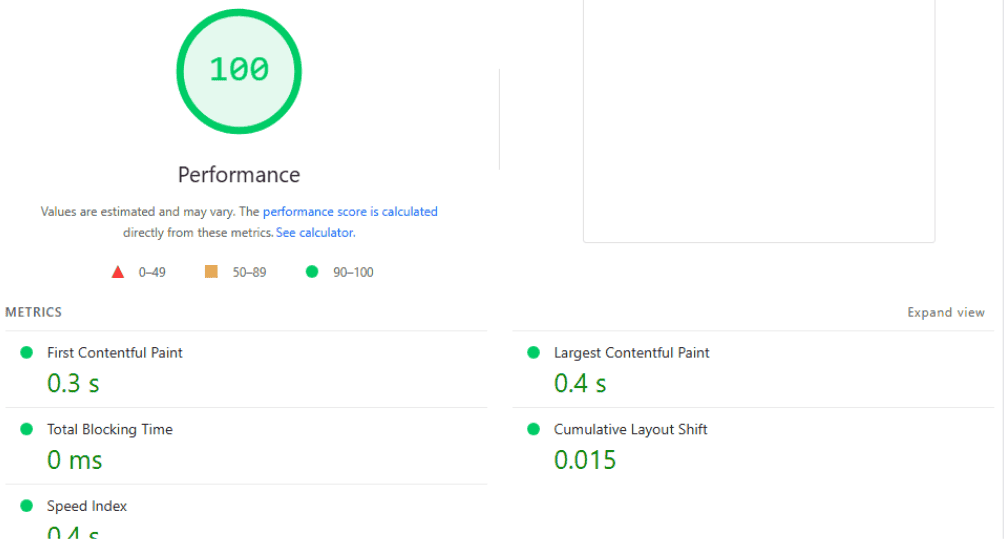
The results were better than I expected. My site consistently loaded in under 1 second on US servers, and around 2.5 to 3.0 seconds when tested from Europe and Asia. For context, anything below 3 seconds is excellent for web hosting. What impressed me most was how steady the speeds were during peak traffic hours. Some hosts start to buckle when everyone’s online at once, but it handled it smoothly.
- Uptime
Speed is important, but if your website frequently goes offline, fast servers don’t count for much. That’s why I tracked DreamHost uptime over 11 days using UptimeRobot and BetterStack. DreamHost delivered an impressive 99.99% uptime average across both tests. To put that into perspective, it’s less than five minutes of downtime in an entire month.
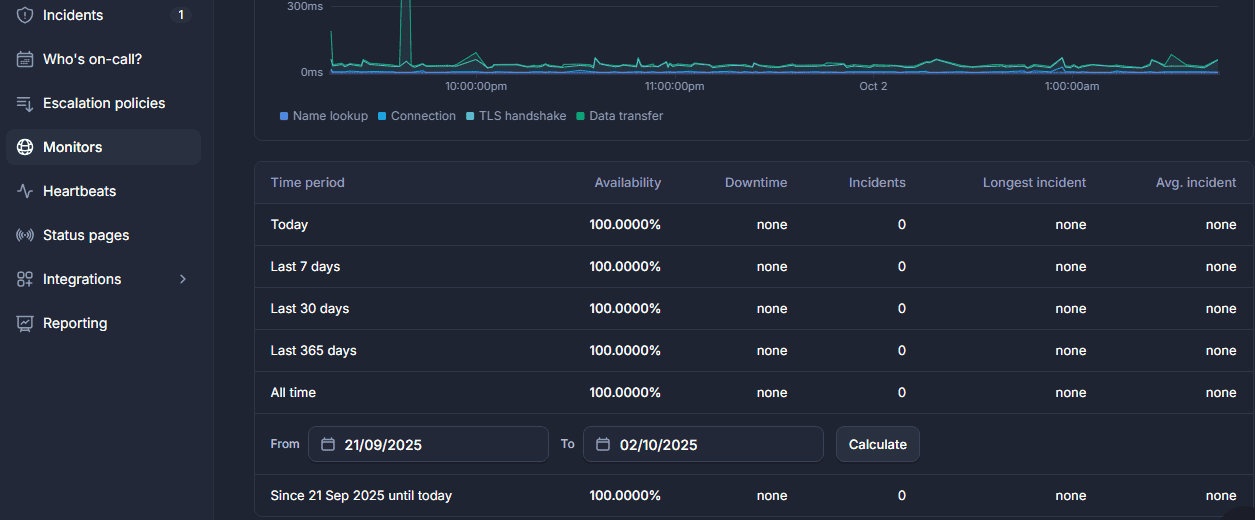
In fact, I recorded only one brief downtime alert during the monitoring period, lasting just three minutes before the server came back online. For comparison, some big-name hosts I’ve tested struggle to maintain 99.9%, which equates to nearly 45 minutes of downtime per month. DreamHost server clearly lives up to its promise of reliability.
Even better, they back their service with a 100% uptime guarantee in their SLA (Service Level Agreement). If your site experiences downtime caused by them, you’re compensated, something few hosts are confident enough to offer.
- Load Handling
Website speed and uptime are important, but they don’t tell the whole story. A website can load quickly for one visitor and still struggle when hundreds or thousands of people try to access it at the same time. To see how DreamHost handled a sudden traffic surge, I used Loader.io to run a concurrent load test against the test website. The goal was simple: put the server under a heavy burst of traffic and see whether response times became unstable, requests started failing, or the server showed signs of struggling.

I pushed the server to 1,200 concurrent connections during the test. The result was encouraging. DreamHost handled the 1,200 concurrent traffic test without any noticeable stability issues. The server continued responding to requests, and I didn’t encounter errors, crashes, or a sudden failure under the test load.
Of course, a 1,200-concurrent-user test shouldn’t be interpreted as saying that every DreamHost website can safely handle 1,200 real-world visitors at once. Actual capacity depends on the hosting plan, website architecture, page complexity, database activity, caching, and the type of requests being made.
DreamHost Customer Support
Customer support can make or break your experience with a hosting company. Even if everything works perfectly today, you want to know that someone can help when your website suddenly stops loading, your domain isn’t resolving, or you’re dealing with a server-related problem. I tested DreamHost’s customer support through its available support channels to see how quickly and effectively the team handled questions and technical issues.
DreamHost provides 24/7 customer support, with live chat and ticket-based support available through the customer panel. It also has a detailed knowledge base containing guides and tutorials covering common tasks, including website setup, domains, email, WordPress, DNS, databases, and server management. During my testing, the support experience was generally good, although response times weren’t always consistent. Straightforward questions were easier to resolve, while technical issues that required additional investigation could take longer and may need escalation.
DreamHost Pros and Cons
After testing DreamHost’s hosting, performance, support, and features, I found plenty to like, but it isn’t perfect for every website owner. The biggest positives are its strong range of hosting options, generous features on its Web Hosting plans, free SSL, automated backups, NVMe storage, multiple data centre locations, 100% uptime guarantee, and the impressive Remixer website and application builder. My load test also showed that the test server remained stable when handling 1,200 concurrent connections. On the other hand, DreamHost’s custom control panel may take some getting used to if you’re coming from cPanel; introductory hosting prices are lower than renewal rates, and some advanced hosting options are for users with technical experience.
Pros
- 100% Uptime Guarantee
They offer a full uptime guarantee, which is rare in the hosting industry. If downtime occurs due to their systems (outside of scheduled maintenance), you may be eligible for service credits. A host that backs its uptime commitment demonstrates greater reliability. DreamHost guarantees 99.99% uptime under its Service Level Agreement (SLA) and consistently delivers on this promise.
- Free Automated Website Migration
They also offer free, automated migration for up to 25 websites with certain plans. This includes moving content, databases, and configurations from other hosts.
- Transparent Pricing with Long-Term Rates Locked In
Unlike many competitors that raise prices upon renewal, DreamHost locks in your rate for the duration of your subscription (up to 3 years). This provides long-term cost predictability and protects you from sudden price hikes.
- Comprehensive Security
All DreamHost web hosting plans include SSL certificates (via Let’s Encrypt), automatic backups (on higher-tier plans), web application firewalls (ModSecurity), DDoS protection, and malware scanning, without requiring additional paid add-ons.
- SSD-Only Storage Across All Plans
All hosting tiers use solid-state drives (SSDs), ensuring faster data retrieval, improved site loading times, and better overall performance compared to traditional HDD-based systems.
- Long Money-Back Guarantee
DreamHost gives a 30-day refund window for web hosting plans. This gives users enough time to test the service (performance, support, ease of use) risk-free.
- Multiple hosting options
Shared hosting, managed WordPress, managed VPS, self-managed VPS, dedicated servers, and cloud services give you plenty of room to scale.
- Multiple data centres
You can choose from several locations, including the United States, Europe, and Singapore.
- Remixer AI-powered Builder
The AI-powered Remixer can create websites and functional web applications, and it can be purchased separately from DreamHost’s traditional hosting plans.
- Unmetered Bandwidth
All DreamHost hosting plans offer unlimited bandwidth; you don’t have to worry about paying surprise costs in case of traffic spikes.
Cons
- No cPanel
DreamHost uses a custom control panel instead of the standard cPanel interface. For users familiar with cPanel, this means adjusting to DreamHost’s unique dashboard and learning its layout.
- Features Only on Higher Tiers
Some useful features, such as staging, advanced malware protection, or priority backups, are only available on more expensive plans. Also, some add-ons (IP addresses, advanced tools) may cost extra.
- Limited Data Centre Locations
Primarily in the U.S. (Ashburn, VA, and Hillsboro, OR), as well as in the Netherlands (Amsterdam) for Europe. If your audience is far away, latency may be higher unless you use a CDN.
- Increase Renewal Price
Introductory prices are attractive, but renewal rates climb noticeably. If someone signs up cheaply, they may be surprised when renewal comes.
Final Verdict
After testing DreamHost’s hosting, monitoring its uptime, checking its page speed, putting the server through a 1,200-concurrent-connection load test, and spending time with its features, I came away with a positive impression. DreamHost gets many of the fundamentals right. Its Web Hosting plans are easy to understand, include useful features such as free SSL, automated backups, NVMe storage, and unmetered bandwidth, and give you several options as your website grows. The 100% uptime guarantee is also a nice touch, though it comes with specific terms and conditions.
Performance was another area where DreamHost performed well in my testing. My test server remained stable when I pushed it to 1,200 concurrent connections with Loader.io, without crashes, server errors, or other noticeable stability problems. My uptime monitoring also showed strong availability during the monitoring period, while Google PageSpeed gave me another way to evaluate the website’s loading performance. I was also impressed by the range of hosting options. You can start with Web Hosting Launch, Growth, or Scale, move to DreamPress if you need managed WordPress hosting, or step up to Managed VPS, self-managed VPS, or dedicated hosting as your requirements increase.
Then there’s Remixer, which adds something quite different to the lineup. After using it to build both a website and a web application, I think it deserves attention from anyone who wants to turn an idea into a working project without assembling several different tools. The fact that Remixer includes hosting and can also be purchased as a standalone app makes it even more interesting.
DreamHost isn’t perfect. The custom control panel can take some adjustment if you’re used to cPanel, support response times can vary, and the attractive introductory prices increase at renewal. But those drawbacks don’t outweigh the overall package for me. If you’re launching a blog, business website, affiliate site, portfolio, or WordPress project, DreamHost offers a good combination of features, performance, and room to grow. If your app requires more resources, you can move into VPS or dedicated hosting without moving your entire setup to another server.
So, would I recommend DreamHost? Yes, for the right type of website and application.
Frequently Asked Questions (FAQs)
Is DreamHost good for beginners?
Yes, DreamHost is beginner-friendly thanks to its custom control panel, one-click WordPress installation, free pre-installed SSL, and straightforward setup. You don’t need to be tech-savvy to launch a site. However, if you’re accustomed to cPanel, adjusting to their custom panel may take a little time.
How reliable is DreamHost’s uptime?
DreamHost offers a 100% uptime guarantee and backs it with compensation if downtime occurs. In real-world testing, uptime typically falls between 99.95% and 100%, which is excellent compared to many budget-friendly hosting providers.
How fast is DreamHost hosting?
Speed depends on your plan and the website’s setup. DreamPress (managed WordPress) comes with built-in caching and SSD storage, which makes websites load noticeably faster than the web starter plans. Adding a CDN and a lightweight WordPress theme can push load times under 2 seconds.
Does DreamHost include a free domain name?
Yes. Annual plans on Web Hosting and DreamPress include one free domain for the first year (.com, .org, .net, and other common TLDs). Domain renewals apply after the first year.





0 Comments