


I spent several weeks putting InterServer through real-world testing, using a production WordPress website running Divi on a 2-slice KVM VPS. I tested its CPU and storage performance, network speed, website response under load, uptime, server deployment, dashboard usability, pricing, and customer support. Based on the results and my hands-on experience, InterServer earned an overall rating of 4.7/5, making it a strong choice if you are looking for affordable hosting with flexible resources and solid performance.
Finding a web host is easy. Finding one you can trust with a real website is a different story. Choosing a web host is one of those decisions that can quietly determine how well your website performs. A fast server can mean quicker page loads and a better visitor experience, while poor performance can turn even a well-built website into a slow, frustrating experience.
InterServer has built its reputation around affordable hosting, a wide range of hosting options, and infrastructure for businesses, bloggers, developers, and growing websites. But the real question is simple: how do InterServer's servers perform when you actually put a website on them? I wanted to find out for myself. So, I purchased 2-slices of InterServer VPS hosting and put it through a series of hands-on tests covering server performance, storage speed, network performance, website loading speed, uptime, and reliability.
I also evaluated the control panel, account dashboard, ease of use, pricing, features, and customer support to get a clear picture of the overall customer experience. My testing includes UptimeRobot for uptime monitoring, Loader.io for load testing, Google PageSpeed Insights for website performance, fio for storage performance, Geekbench for CPU performance, Sysbench for system and database testing, and YABS for a broader server performance assessment.
I won't judge InterServer based on a single benchmark score. A hosting server can produce an impressive CPU result and still deliver a poor experience if its network is unreliable or its performance drops under load. That's why I looked at several areas before reaching a final verdict. Throughout this review, I’ll share the test results, explain what they mean, and highlight both the strengths and weaknesses I discovered during testing. So, after putting InterServer through real-world performance, uptime, network, usability, pricing, and support tests, is it a hosting provider worth trusting with your website?
Table of Contents
InterServer Quick Overview
During testing, I evaluated InterServer as customers with a working, live website or application would. I deployed a live server and tested its performance, network speed, uptime, reliability, ease of use, pricing, and customer support. Here’s how I rate the service across the areas that matter most to website owners. These scores are based on my test results, observations, and overall experience throughout the review rather than on a single benchmark.
| Feature | Rating | Details |
|---|---|---|
| 🎯Overall Rating | ⭐⭐⭐⭐⭐ (4.7/5) | Excellent server performance |
| 📡Network Performance | ⭐⭐⭐⭐⭐ (4.8/5) | Fast and consistent network performance based on latency. |
| 🕒Uptime & Reliability | ⭐⭐⭐⭐⭐ (4.9/5) | Excellent uptime and reliable server |
| 🔒Security Features | ⭐⭐⭐⭐☆ (4.5/5) | Strong built-in security & private networking |
| 👌Ease of Use | ⭐⭐⭐⭐☆ (4.4/5) | Easy-to-use dashboard & hosting management |
| 🧭Server Deployment | ⭐⭐⭐⭐⭐ (4.8/5) | Quick server provisioning and setup |
| 💰Pricing & Value | ⭐⭐⭐⭐⭐ (4.7/5) | Affordable price with strong value |
| 💡Customer Support | ⭐⭐⭐⭐☆ (4.5/5) | Customer support is great |
InterServer delivers a strong combination of performance, network reliability, features, and value. Its biggest strengths become clearer when you look beyond the headline price and examine how the hosting performs under actual testing conditions.
🔥 Exclusive Offer: Get your first month of InterServer hosting for just $0.01 with our exclusive coupon code SCRIBEAGE. Claim the offer today and put InterServer to the test for practically nothing. Use our exclusive offer link and enter the coupon code SCRIBEAGE at checkout to claim the deal.
What is InterServer?
InterServer is a US-based web hosting company that provides hosting infrastructure for individuals, businesses, developers, and organisations. Founded in 1999 by John Quaglieri and Michael Lavrik, InterServer has grown from a small hosting operation into a provider offering shared hosting, WordPress hosting, VPS hosting, dedicated servers, colocation, and other infrastructure services.
One thing that stands out about InterServer is the wide range of hosting options available from a single dashboard. Someone starting with a small WordPress website can begin with shared hosting, while a growing business can move to VPS or dedicated server infrastructure as its resource requirements increase.
InterServer operates its own data centres in the United States, including facilities in Secaucus, New Jersey, and Los Angeles, California. Its New Jersey facility plays an important role in its hosting operations and provides connectivity to multiple network carriers. The company also has a reputation for keeping its hosting offering relatively straightforward. Rather than building its business around a long list of flashy extras, InterServer focuses on server resources, infrastructure, security, and affordable hosting plans.
InterServer Hosting Key Features
InterServer offers more than the basic hosting features you'd expect from a conventional web host. Its VPS and server infrastructure includes tools aimed at performance, security, networking, and server management, while shared hosting customers get access to familiar tools such as cPanel, DirectAdmin, and Plesk.
Here are some of the key InterServer features.
- Free DDoS Protection
InterServer provides DDoS protection as part of its infrastructure, helping protect servers and hosted services against Distributed Denial-of-Service attacks. A DDoS attack attempts to overwhelm a server or network connection with a large volume of traffic, potentially making websites and applications inaccessible. For businesses, this protection is important because an attack can affect website availability, application performance, and network connectivity.
- Managed Support
InterServer provides managed support options that reduce the amount of server administration you need to handle yourself. Managed support is useful for users running VPS or dedicated servers who may need assistance with server configuration, software installation, troubleshooting, networking, or other infrastructure-related tasks.
- BYOIP & BGP
If your business needs to maintain established IP addressing, reputation, or network policies when moving infrastructure. InterServer supports Bring Your Own IP (BYOIP) and Border Gateway Protocol (BGP) capabilities. BYOIP lets you use IP address space that you already own rather than relying on IP addresses assigned by the hosting provider. BGP is the routing protocol used to exchange routing information between autonomous systems on the internet. Access to BGP capabilities gives you greater control over how your network prefixes are advertised and routed.
- Integrated Firewall
InterServer provides firewall capabilities as part of its server infrastructure, giving your server an additional layer of protection against unwanted network traffic. A firewall can help control which connections are allowed to reach a server while blocking traffic that doesn't meet the configured rules.
- Floating IP
A floating IP provides an IP address that can be moved between eligible server instances rather than being permanently tied to one particular server. You can deploy a floating IP when building highly available applications or planning failover. If your primary server becomes unavailable, the IP can be reassigned to another server, allowing services to continue using the same public address.
- IPMI Management
InterServer also offers IPMI management on supported dedicated server configurations. IPMI (Intelligent Platform Management Interface) provides out-of-band access to physical server hardware. It lets administrators manage a server even when the operating system or normal network connection isn't responding. IPMI allows server administrators to remotely power a server on or off, reboot it, access the console, monitor hardware, and troubleshoot boot or operating system issues.
- Free Website Migration
InterServer includes free migration with its Standard Web Hosting package. You can move an existing website from another hosting provider. Instead of manually transferring files, databases, email accounts, and configuration, you can use InterServer's migration service.
- Weekly Backups
Weekly backups are included with InterServer's Hosting packages. This gives you a recovery option if something goes wrong with your website or application.
- Email Hosting
InterServer's environment supports domain-based email accounts, forwarding, autoresponders, filters, and webmail. You can create addresses such as [email protected] and manage them from the same hosting environment as your website.
- Easy Scaling
InterServer's architecture lets you scale as your resource requirements increase; you can start small if you are unsure, then scale when usage justifies it. You can increase the number of slices as the VPS needs more CPU, memory, storage, or transfer.
What We Tested
To determine whether InterServer can deliver the speed, stability, network performance, and reliability that website owners, businesses, developers, and growing online projects need from their hosting provider. I deployed a 2-slice VPS server and used it as I would any production server, installing a complete website and running a series of performance, reliability, and network tests. This approach gives me a consistent baseline for evaluating InterServer. Rather than testing an empty server with nothing running on it, I installed a complete WordPress website with real content. Then I subjected the hosting environment to a series of CPU, storage, website performance, uptime, network, and load tests.
- Server Specifications
I used the following server configuration for the InterServer tests:
| Specification | Configuration |
|---|---|
| Hosting Provider | InterServer |
| Server Location | New Jersey |
| Virtual CPU | 1 vCPUs |
| Memory | 4 GB RAM |
| Storage | 80GB NVMe SSD |
| Public Network | Dedicated Public IPv4 |
This configuration provides minimal CPU, memory, and storage capacity to run a live website while leaving sufficient resources for server-level and load testing. The goal isn’t to declare a winner based on specifications alone, but to see how different hosting environments perform when given a comparable workload.
- Testing Environment
To simulate a realistic hosting environment, I installed a complete software stack rather than running benchmarks on a freshly deployed server. The testing environment consisted of the following components.
| Component | Configuration |
|---|---|
| Operating System | Ubuntu 24.04 LTS |
| PHP Version | PHP 8.3.4 |
| Web Server | Nginx |
| Database | MariaDB |
| CMS | WordPress 7.1 |
| Theme | Divi 5.9.0 |
| Caching | None |
| Redis | Not Installed |
I intentionally didn't install caching plugins or Redis. Caching can significantly improve page-loading performance, but it can also make it harder to determine how much of that performance comes from the hosting server itself. By testing without these additional optimisation layers, I can get a clearer picture of the underlying server, storage, database, and network performance. The test website contained blog posts, images, embedded videos, plugins, and an established database.
- Testing Tools
I used a combination of server-level benchmarks, website performance tools, uptime monitoring, and load testing to evaluate different aspects of the hosting environment. These included:
| Testing Area | Tool |
|---|---|
| Uptime & Availability | UptimeRobot |
| Website Performance | Google PageSpeed Insights |
| Load Testing | Loader.io |
| Storage Performance | fio |
| CPU Performance | Geekbench |
| System Performance | Sysbench |
| Overall Linux Server Benchmark | YABS |
| Network Performance | Speed and latency tests |
Each tool serves a different purpose. Geekbench and Sysbench help evaluate processing performance, fio measures storage performance, YABS provides a broader view of Linux server performance, and Loader.io helps determine how the server behaves when multiple requests arrive within a short period. Uptime monitoring provides a longer-term view of availability rather than relying on a single speed test. Meanwhile, Google PageSpeed Insights helps evaluate how the actual website performs from a visitor’s perspective.
InterServer Server Deployment
For this review, I chose InterServer’s KVM Linux VPS instead of shared hosting because I wanted to test the platform in an environment with greater control over the server. I selected two VPS slices at $3 per slice, bringing the total cost to $6 per month for the VPS resources. I deployed the VPS in New Jersey and configured it with Ubuntu 24.04 64-bit.
- VPS Deployment Process
After selecting the KVM Linux VPS and New Jersey as the server location, I provisioned the instance with Ubuntu 24.04 64-bit. Once the VPS was available, I performed the initial server configuration before installing the website and testing tools. This included preparing the operating system, configuring the required software environment, and installing the components needed to run the WordPress test site. I deliberately kept the server configuration as close to a standard VPS installation as possible. I didn't add performance-enhancing caching layers or optimisation tools that could make the benchmark results look better than the underlying server performance.
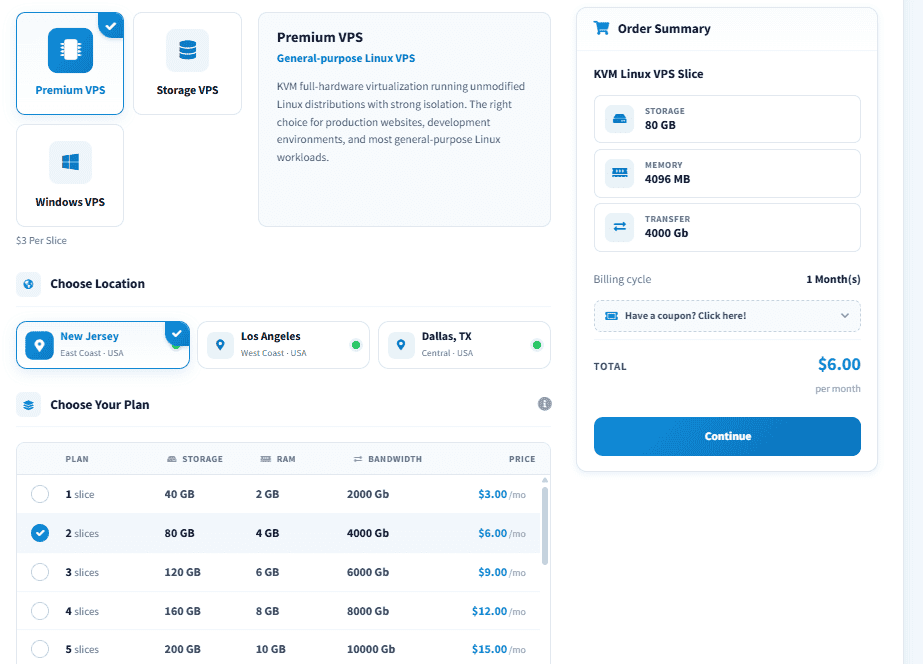
I selected 2-slices VPS because it provides a reasonable amount of computing and storage resources for running a WordPress website while keeping the test within the lower-cost VPS range. This also makes the test more useful for small businesses, bloggers, developers, and website owners who don't need a large dedicated server but still want the control a VPS offers.
The 4GB RAM and 80GB storage give the test environment enough room for the WordPress installation, database, website media, benchmarking tools, and supporting services without immediately pushing the server to its limits. The 4TB bandwidth allowance also provides plenty of headroom for load and network testing without making bandwidth capacity the limiting factor.
Performance, Uptime, Network & Reliability Tests
A hosting provider can have an impressive specification sheet, but the real test begins after a website is placed on the server and starts behaving like an actual website. For this review, I used a cloned WordPress website of my company running the Divi theme, rather than testing an empty server with a basic WordPress installation. The website includes published blog posts, images, videos, plugins, and a working database, giving the VPS a realistic workload during testing.
I also deliberately avoided installing a caching plugin or enabling Redis. Caching can greatly improve page-load times, but it can also mask the server's underlying performance. By leaving these optimisations disabled, I can get a clearer picture of how the InterServer VPS handles WordPress at the server and application level.
Page Speed Test
I tested the website frontend performance using Google PageSpeed Insights. PageSpeed Insights evaluates how a webpage performs for visitors and reports several important performance metrics, including Largest Contentful Paint (LCP), First Contentful Paint (FCP), Total Blocking Time (TBT), and Cumulative Layout Shift (CLS). While these results are influenced by the website’s theme, plugins, images, page structure, and other frontend factors, the hosting server still plays an important role in how quickly the initial website request is processed and delivered.
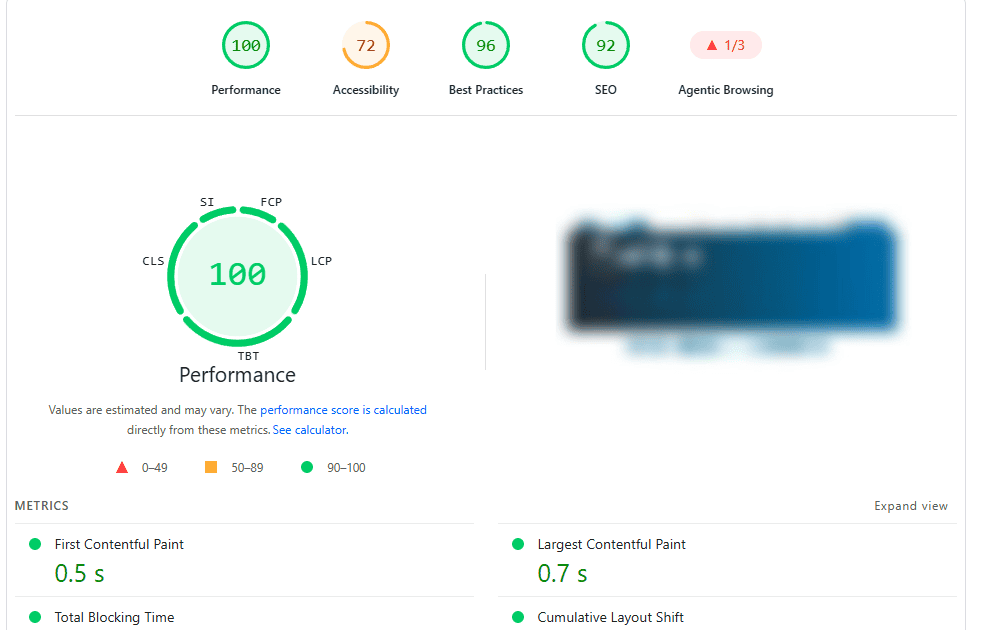
The results provide an initial indication of how quickly the InterServer VPS can serve a real functional website without relying on additional server-side caching or Redis optimisation.
Server Load Testing
A website that performs well with a single visitor can behave very differently when traffic increases. To find out how the InterServer VPS handles a sudden increase in requests, I used Loader.io to perform controlled load testing. I gradually increased the test workload from 250 to 1,500 concurrent clients over one minute. The purpose was to observe how the VPS responded as the number of simultaneous requests increased and whether performance would remain stable under pressure.
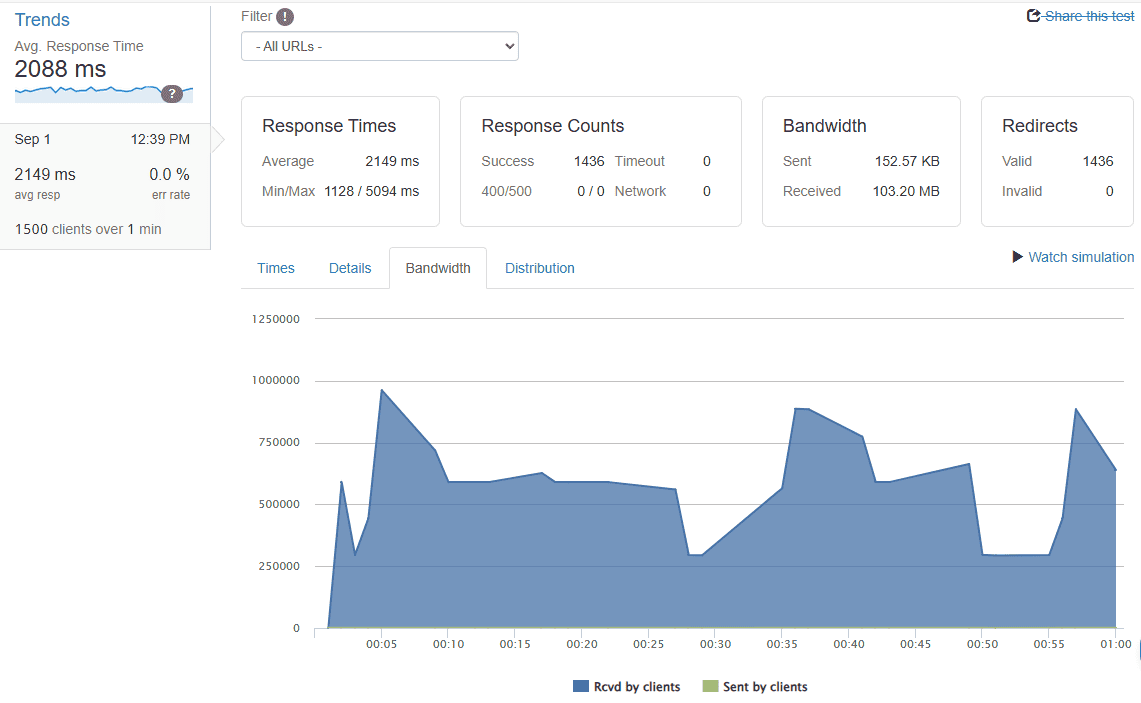
During the test, I monitored several metrics, including average response time, peak response time, request success rate, HTTP error rate, timeouts, server stability and behaviour as traffic increased. The server handled the workload well throughout the test. Even as users increased to 1,500, response times remained stable, with no performance fluctuations.
CPU and Memory Performance
After testing the website, I moved down to the underlying VPS resources. For CPU performance, I used Geekbench to measure single-core and multi-core processing capabilities. These tests provide a useful indication of how the virtual CPU handles different computational workloads. The InterServer VPS used for this review has 2 slices, 4GB of RAM, and 1 CPU core.
| Test | Result | Rating |
|---|---|---|
| Geekbench Single-Core | 991 | Good |
| Geekbench Multi-Core | 3325 | Good |
| WordPress Load Test | 1,500 concurrent clients | Excellent |
| HTTP Errors | 0 | Excellent |
| Timeouts | 0 | Excellent |
| Nginx | Stable | Excellent |
| Ubuntu 24.04 | Stable | Excellent |
The 4GB of RAM handle WordPress, PHP, MariaDB, Nginx, operating-system processes, and any other services running on the VPS. I therefore monitored memory usage during normal website activity and load testing to determine whether the available RAM was sufficient or whether the server showed signs of memory pressure.
Network Performance
Network performance is another important part of my InterServer test because a powerful server is of limited use if it has slow or inconsistent connectivity. The InterServer VPS used for this review is located in New Jersey, so I evaluated its network performance from external testing points to examine download speed, upload speed, latency, and general connectivity. I used network testing tools to measure throughput and latency and looked for significant variations during the testing period.
The tests focused on download throughput, upload throughput, network latency, connectivity, consistency, and packet loss, where measurable. The New Jersey location is an advantage for websites whose visitors are concentrated in North America. The results were impressive. Network throughput remained stable when testing from the North America region throughout my testing, while latency stayed consistently low for the selected server location, but latency increased from other locations.
Uptime Monitoring
I know that performance is only useful when the website remains accessible. To measure InterServer’s reliability over time, I monitored the website using UptimeRobot. The monitoring allowed me to track availability, response time, and any downtime incidents during the testing period. Rather than relying on a single uptime check, continuous monitoring gives me a better picture of how consistently the VPS remains reachable. I tracked overall uptime percentage, downtime incidents, response time, availability trends and any unexpected interruptions
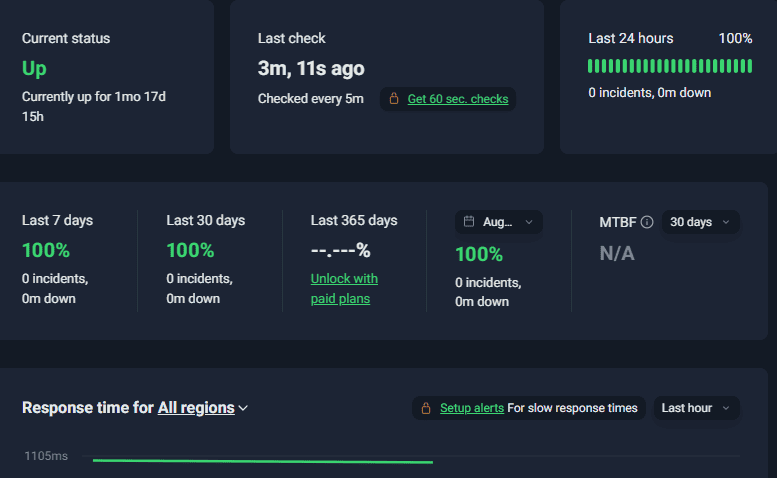
During my 30-day monitoring period, the InterServer server maintained 100% uptime with zero recorded incidents. I monitored the server continuously using UptimeRobot and recorded no unexpected downtime or availability failures throughout the testing period. Though the 30-day monitoring period shows how the server performed during my test, it cannot predict every future outage or maintenance event.
Control Panel, Dashboard & Ease of Use
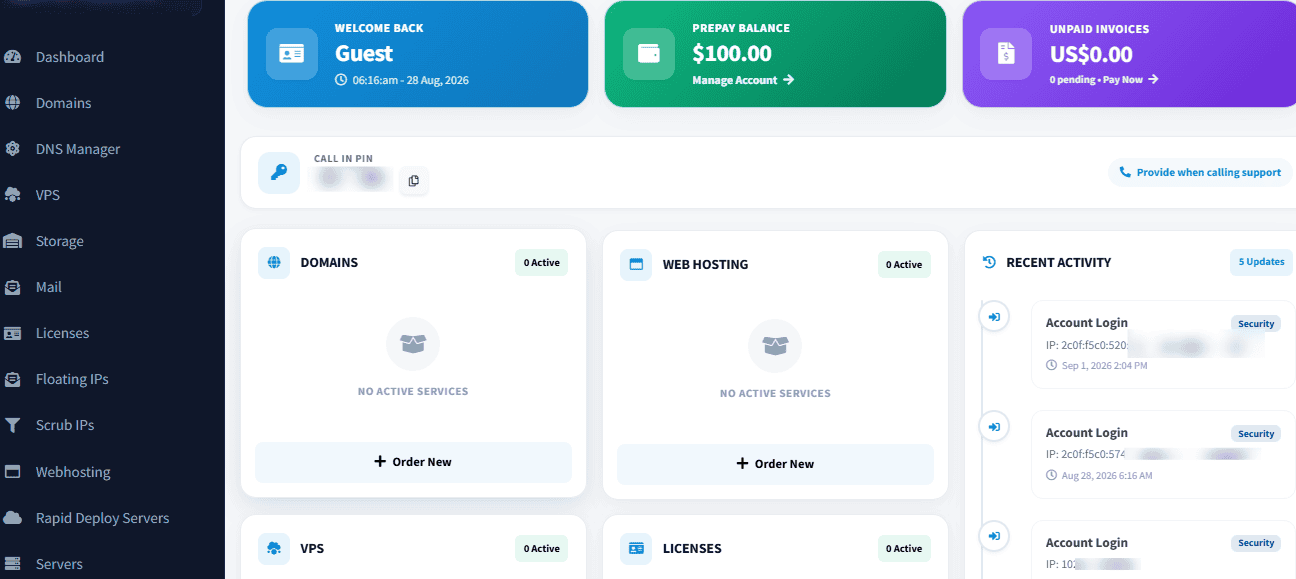
InterServer takes a fairly straightforward approach to account and server management. Instead of making customers search through several different interfaces to find basic functions, the main dashboard puts domains, hosting, VPS, dedicated servers, networking services, billing, support, and account settings in one place.
The dashboard doesn’t feel intimidating for someone new to hosting, while still providing access to advanced infrastructure services. I found InterServer’s dashboard easy to use, with clear navigation and relatively self-explanatory service categories. I didn’t need much time figuring out where to find common functions such as domain management, VPS deployment, billing, or customer support.
- Dashboard Overview
The main InterServer dashboard acts as the central management area for your account. From here, you can find and register domains, manage DNS records, purchase hosting services, deploy VPS instances, manage servers, access billing information, and contact support. Having these functions accessible from the same dashboard makes routine account management easier.
- Hosting Deployment
One of the first things I noticed was how quickly I could set up a new hosting service. Deploying a new server, be it shared hosting, a VPS instance, Windows hosting, or a dedicated server, is straightforward. After selecting the required service and configuration, the provisioning process was completed without unnecessary steps or a complicated setup.
For VPS users, being able to choose the server configuration, location, and operating system during the ordering process makes deployment simple. Shared hosting customers also have access to different control panel options, including cPanel, DirectAdmin, and Plesk, depending on the hosting product selected.
- VPS Management
The VPS environment provides a different level of control from shared hosting. After deploying my KVM Linux VPS, I could access the server and continue with the configuration required for my WordPress testing environment. This gives technically experienced users the freedom to install and configure the software they need rather than being restricted to the settings available in a shared hosting account. InterServer’s main dashboard handles account and service management, while the VPS is managed at the server level according to the operating system and tools installed on the instance.
- cPanel, DirectAdmin and Plesk
InterServer supports several popular hosting control panels, including cPanel, DirectAdmin, and Plesk for applicable hosting products. These control panels are separate from the main InterServer customer dashboard. Instead, they provide the tools you need to manage your actual hosting environment. Depending on the control panel and hosting plan, you can manage websites, domains, databases, email accounts, files, SSL certificates, and other hosting functions through a graphical interface. This separation makes sense. The dashboard manages your relationship with the hosting provider, billing, services, and infrastructure, while the selected control panel manages the hosting environment itself.
🔥 Exclusive Offer: Get your first month of InterServer hosting for just $0.01 with our exclusive coupon code SCRIBEAGE. Claim the offer today and put InterServer to the test for practically nothing. Use our exclusive offer link and enter the coupon code SCRIBEAGE at checkout to claim the deal.
InterServer Pricing & Plans
InterServer takes a relatively simple approach to pricing: instead of forcing customers into a long list of fixed server configurations, its KVM cloud compute platform uses a slice-based pricing model. Each slice adds a defined amount of CPU, memory, SSD storage, and transfer capacity, allowing you to start small and add resources as your needs grow. InterServer’s cloud compute plans start at $3 per month per slice.
The pricing model is interesting for developers and businesses because you don't necessarily have to jump from a small VPS to a much larger fixed package. InterServer lets you add additional slices as resource requirements increase.
Standard Hosting
If you don't need root access or the responsibility of managing a VPS, InterServer's standard hosting is the simpler option. Its cPanel hosting plan starts at $2.50 for the first month, with the monthly plan renewing at $8 per month. You can enjoy one-year billing for $30 and renew at $96. The standard web hosting package is good for personal websites, blogs, businesses, and smaller online stores. It includes features such as cPanel, email, SSL, backups, application installation, and migration assistance. With InterServer standard web hosting, you will enjoy unlimited storage space, unlimited data transfer, weekly backups, unlimited FTP accounts, cloud apps, SSD caching servers, speed optimisation, 10GB Cisco network, free migration, free Cloudflare CDN and unlimited domains.
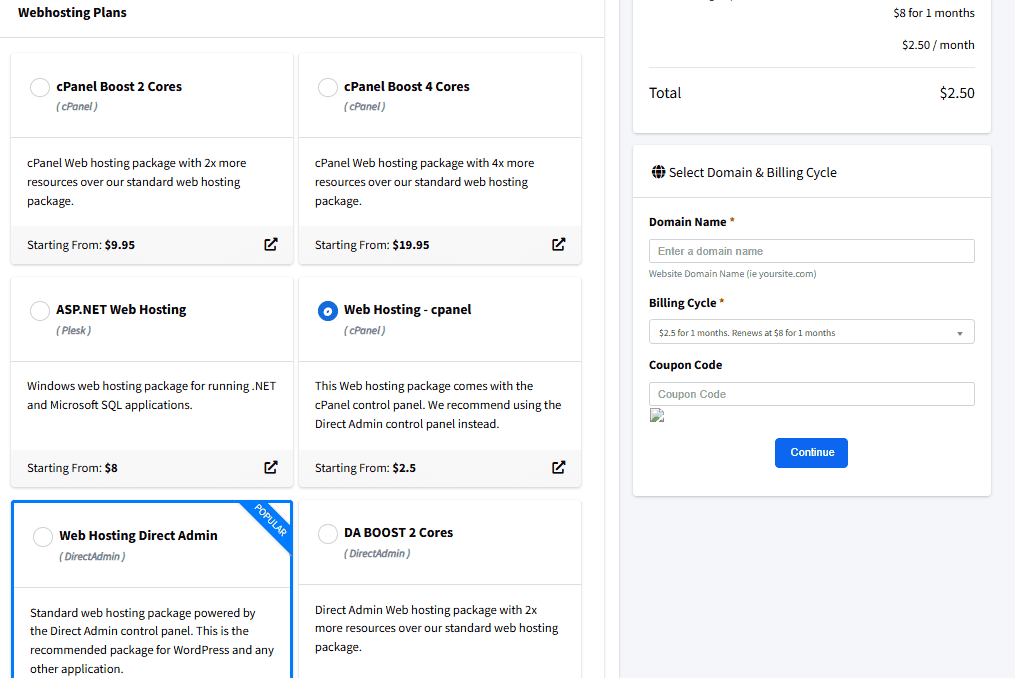
One feature I like here is InterServer's Price Lock Guarantee. The Price Lock provides a predictable renewal price for web hosting customers rather than relying on a very cheap introductory rate followed by a large renewal increase. That makes the long-term cost worth examining rather than looking only at the promotional first-month price.
InterServer VPS Hosting
InterServer's KVM cloud compute starts at $3 per slice per month. The slice model allows you to increase resources by adding slices instead of having to migrate immediately to a completely different server. The VPS platform supports Linux and Windows workloads, with root or administrator-level access depending on the operating system. InterServer also provides options for control panels and application-specific VPS configurations.
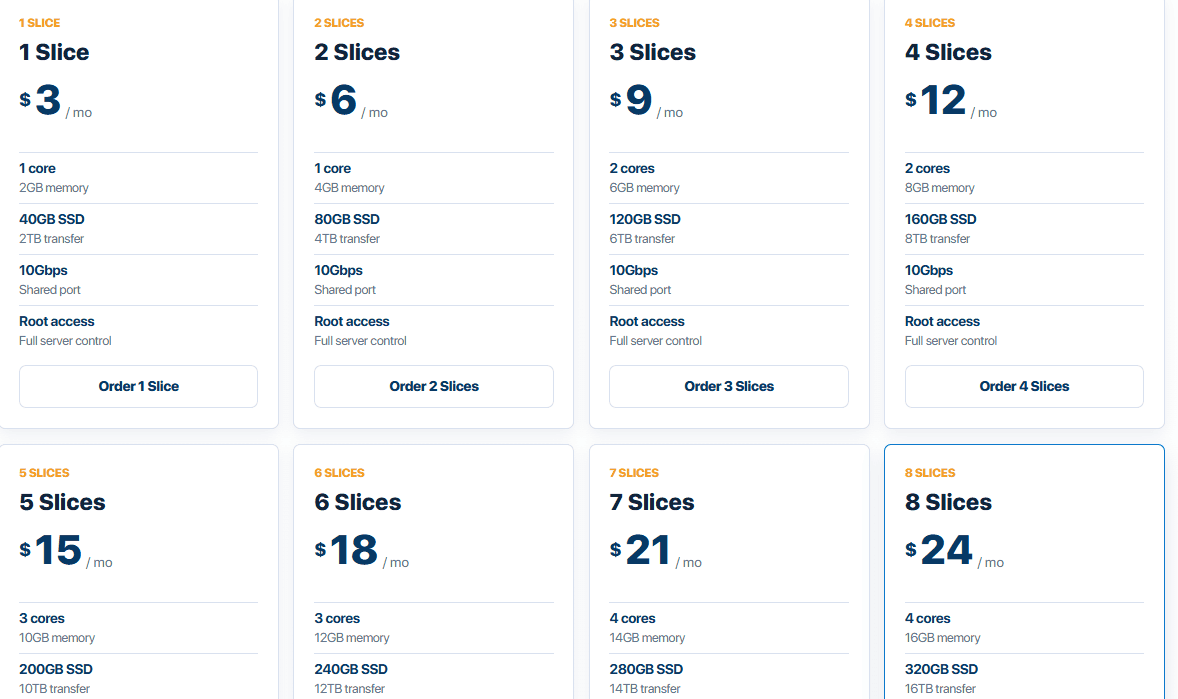
The Linux VPS slice costs $3 per slice, while the Windows VPS costs $5 per slice, and you will need at least 2 slices, which is $10 per month on Windows VPS. However, additional configurations can change the final cost. Control panels and other VPS add-ons may carry separate charges, so the $3 and $5-per-slice starting price shouldn't be treated as the final cost of every VPS configuration.
Dedicated Servers
For websites and applications that have outgrown VPS hosting, InterServer also offers dedicated and bare-metal servers. The dedicated server range is much broader than the VPS offering, with different processors, RAM configurations, storage options, network speeds, and server locations.
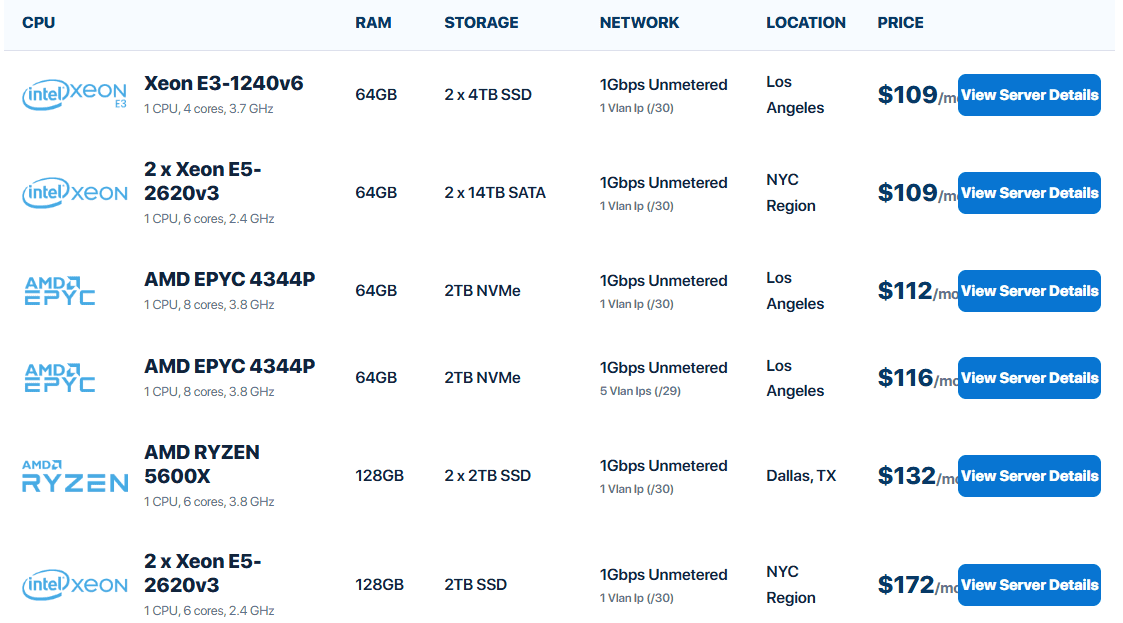
InterServer's least expensive dedicated server, Xeon E3-1240v6, costs $109 per month and includes1 CPU, 4 cores, 3.7 GHz, 64GB RAM, 2 x 4TB SSD, 1Gbps Unmetered, and 1 VLAN IP (/30). Dedicated servers also provide features such as DDoS protection and IPMI access. These servers give you exclusive access to physical hardware, making them ideal for high-performance databases, virtualisation, CI/CD pipelines, API-driven applications, AI agent frameworks, enterprise applications, gaming infrastructure, and other resource-intensive workloads.
🔥 Exclusive Offer: Get your first month of InterServer hosting for just $0.01 with our exclusive coupon code SCRIBEAGE. Claim the offer today and put InterServer to the test for practically nothing. Use our exclusive offer link and enter the coupon code SCRIBEAGE at checkout to claim the deal.
InterServer Pros & Cons
After spending time deploying servers, running benchmarks, monitoring performance, and managing the platform through its cloud dashboard, I understand where InterServer excels and where there is still room for improvement. Like any cloud hosting provider, InterServer isn’t perfect. While I was impressed by its affordable slice pricing, infrastructure, performance, and ease of use, I also identified a few areas where the service could be improved.
Pros
- Very competitive VPS pricing
InterServer's slice-based VPS pricing is one of its strongest selling points. The KVM Linux VPS starts at $3 per slice, and the 2-slice configuration costs $6 per month with 1 CPU core, 4GB RAM, 80GB storage, and 4TB of transfer. For developers, bloggers, small businesses, and growing websites that need root access without paying for a large VPS package, that is a compelling price-to-resource ratio.
- Fast VPS and Hosting Deployment
Creating a new VPS instance was quick during my testing. I also found the process of creating a shared hosting account straightforward. This is useful when you need to get a website, application, or testing environment online without waiting through a lengthy provisioning process.
- Easy-to-use Customer Dashboard
The InterServer dashboard is one of the areas I found particularly convenient. From one account interface, I could manage domains, DNS, VPS instances, storage, shared hosting, dedicated servers, Floating IPs, Scrub IPs, billing, support tickets, and account settings.
- Multiple Hosting Products
InterServer covers a lot of ground. You can choose from shared hosting, VPS, dedicated servers, storage services, Rapid Deploy Servers, and other infrastructure products. That gives you room to move to a more powerful hosting environment without necessarily changing providers.
- Strong Infrastructure Options
InterServer goes beyond basic web hosting features with options such as KVM virtualisation, dedicated servers, Floating IPs, Scrub IPs, IPMI on supported hardware, BGP/BYOIP capabilities, and network security services. These features are for developers, businesses, network operators, and customers with more advanced infrastructure requirements.
- Free DDoS Protection
DDoS protection is available on InterServer's VPS offering, providing an additional layer of protection against traffic-based attacks.
- Multiple Control Panel Options
For applicable hosting products, InterServer offers options including cPanel, DirectAdmin, and Plesk. You are not locked into a single control panel. You can always choose a control panel you are used to.
- Strong Security Features
InterServer provides features such as DDoS protection, firewall capabilities, SSL support, backups, IP management, and infrastructure-level controls. These tools give you greater control over server security, protection, and management.
Cons
- USA-focused Data-centre Locations
This is probably the biggest geographical limitation I noticed. InterServer’s infrastructure is heavily focused on the United States. If your website targets visitors in Africa, Europe, Asia, or other regions outside the US, you may experience higher latency due to the greater distance between your visitors and the servers.
- No Built-In Staging Environment
Another limitation I noticed with InterServer is the lack of a built-in staging environment as a standard feature. A staging environment allows you to create a separate copy of your website where you can safely test plugin updates, theme changes, code modifications, and other major changes before applying them to your live site.
- No Free Domain
Another limitation is that InterServer doesn't generally include a free domain registration for the first year with its standard hosting packages. Some competing hosting providers use a free first-year domain as an incentive to attract new customers. With InterServer, you'll generally need to purchase your domain separately if you don't already own one.
InterServer Customer Support
InterServer offers 24/7 customer support through live chat, tickets, email, and phone, covering hosting, server, billing, and technical issues. During my testing, I found the ticket system easy to use; you can raise a ticket from the customer dashboard and monitor existing requests without leaving the main account area. This makes it easy to keep track of ongoing issues.
Support quality comes down to the response you receive, not simply the availability of a support channel. For this review, I evaluated InterServer’s customer support based on response time, technical knowledge, and clarity of communication. Live chat responded within 2 minutes, while support tickets received a response within 2 hours.
Final Verdict
After testing InterServer’s KVM VPS with a real website, monitoring uptime, checking network performance, running server benchmarks, and using the platform for regular website management, I found InterServer to be a strong hosting plan for users who want good resources without a high monthly cost. The quick server deployment was a pleasant start, while the customer dashboard made it easy to manage VPS services, domains, DNS, billing, support tickets, and other products from one place.
With InterServer, you can start with shared hosting and move to VPS or dedicated infrastructure as your requirements increase. More advanced users also have access to options such as Floating IPs, Scrub IPs, DDoS protection, firewall capabilities, and IPMI on supported infrastructure. InterServer’s server locations are concentrated in the United States, which may result in higher latency for audiences located far from North America. A KVM VPS also requires a reasonable level of technical knowledge unless you choose an applicable managed service. Some additional services and control panels can also increase the final cost.
So, is InterServer worth it? Yes, particularly if you want affordable shared hosting and a VPS with good resources, fast deployment, and plenty of control. I recommend InterServer to bloggers, developers, businesses, agencies, and website owners who need affordable hosting to get their business online.
🔥 Exclusive Offer: Get your first month of InterServer hosting for just $0.01 with our exclusive coupon code SCRIBEAGE. Claim the offer today and put InterServer to the test for practically nothing. Use our exclusive offer link and enter the coupon code SCRIBEAGE at checkout to claim the deal.





0 Comments